Car Phone Mount Types, Explained
Car phone mounts differ in where they attach (vent, dash, windshield or cup holder) and how they grip (clamp or magnet); the right one fits your car and phone.

By Damien VolkmanContributing writer.
On this page
The short answer
A car phone mount answers two questions: where it attaches, and how it holds the phone. Pick the spot that fits your car and keeps the screen in view without blocking the road, then the grip that fits your phone.
Where it attaches
| Mount type | Attaches to | Good for | Watch out for |
|---|---|---|---|
| Vent | An air vent slat, with a clip or hook | Quick fitting, no adhesive | Round or weak vents; heat or cold blowing on the phone |
| Dashboard | The dash top, with adhesive or a suction pad | A steady, high view | Textured or curved dashes where pads do not stick |
| Windshield | The glass, with a suction cup | Flexible positioning on an arm | Local rules on what may be mounted on the glass |
| Cup holder | A post that expands in a cup holder | No adhesive, sturdy base | Sits low, so the screen is farther from your line of sight |
Vent mount vs dashboard mount
A vent mount clips on quickly and moves between cars. The trade-off is that it depends on the vent. Thin or round slats may not hold a heavy phone steady, and the phone sits in the air stream.
A dashboard mount is usually steadier and puts the phone higher, closer to your view of the road. It takes more care to install, since adhesive and suction pads need a clean, smooth surface.
Clamp or magnet
- Spring clamp: arms close around the sides of the phone. They fit almost any phone, but check that the arms clear the side buttons.
- Magnet: the phone snaps onto a magnetic pad. Phones without built-in magnets need a thin metal plate stuck to the phone or case.
Is a magnetic phone mount safe for my phone?
Apple builds magnets into its own phones: iPhone 12 and later models (other than a few, such as iPhone 16e) use MagSafe, a ring of magnets on the back for alignment and wireless charging. Apple's notes on MagSafe point to two things to watch:
- Cards and badges: Apple warns not to put credit cards, security badges, passports or key fobs between an iPhone and a MagSafe charger, since the magnets may damage magnetic strips or RFID chips. Wallet cases that hold cards behind the phone run into the same problem on a magnetic mount.
- Heat: wireless charging warms the phone, and Apple says software may hold charging at 80 percent if the battery gets too warm. A charging mount in a sunny car adds heat.
Vibration and cameras
Apple warns that strong vibration can wear down the image stabilization and autofocus parts in some iPhone cameras. It advises against mounting an iPhone on motorcycles with high-power engines, and suggests a vibration-dampening mount for scooters and mopeds.
How to choose a car phone mount
- Look at your vents, dash and windshield and rule out what will not fit.
- Check your phone's weight and case thickness against the mount's listing.
- Decide on clamp or magnet; with a magnet, plan for a metal plate if the phone has no MagSafe.
- Place it so the screen does not block your view of the road.
Phone mounts on Wiki Shopping
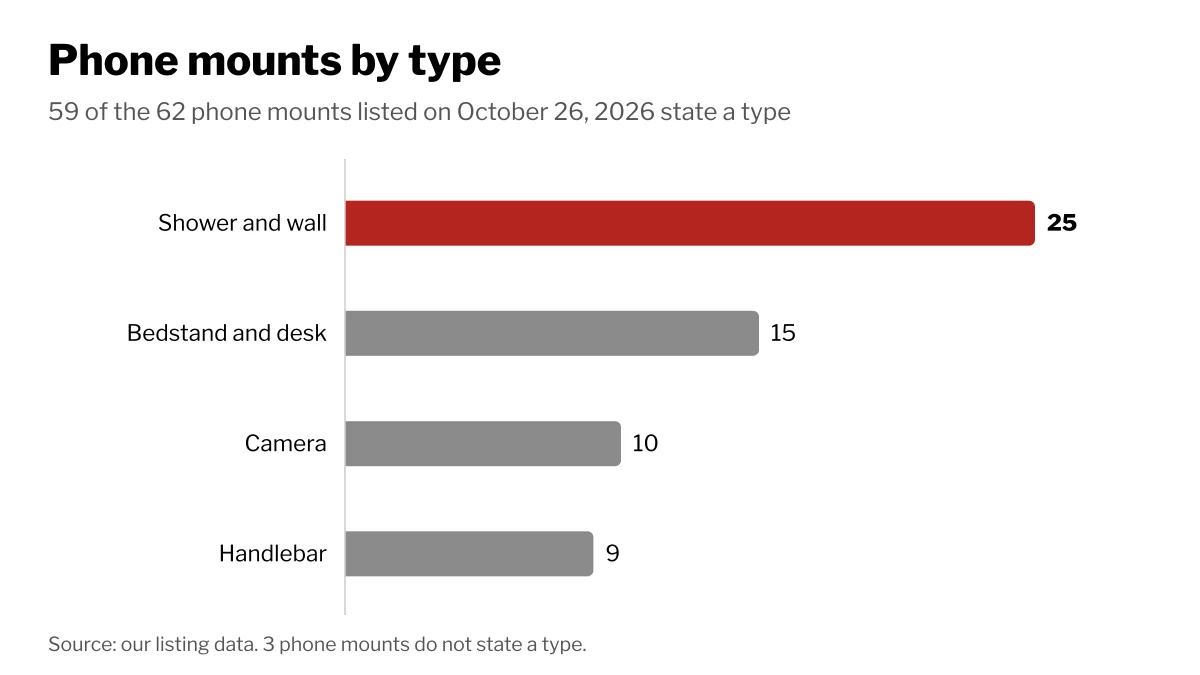
The 62 phone mounts on Wiki Shopping on October 26, 2026 cover more than cars: 59 state a type, led by 25 shower and wall mounts, 15 bedstand and desk mounts, 10 camera mounts and 9 handlebar mounts. Browse them under cell phones and accessories.
How we count
Mount types are read from each store listing, and listings without a stated type are left out. The counts change as listings are added or removed.