Webcam Resolution and Frame Rate, Explained
A 1080p webcam matches the top call quality in Zoom's bandwidth guide; 4K helps when you crop, zoom or record, and 60 fps makes motion smoother than 30 fps.

By Liam McCabeContributing writer.
On this page

The short answer
- 1080p (1920 by 1080 pixels) covers most video calls. The highest video call quality in Zoom's bandwidth guide is 1080p HD.
- 4K (3840 by 2160 pixels) has four times the pixels of 1080p. It pays off when you record video, stream, or crop and zoom into the picture without it turning soft.
- Frame rate is how many pictures per second the camera sends. 30 fps is the usual rate; 60 fps makes movement look smoother.
On Wiki Shopping, 201 webcams list 1080p, 166 list 4K and 73 list 2K or 1440p.
Resolution: 720p, 1080p, 1440p and 4K
| Name | Pixels | Notes |
|---|---|---|
| 720p | 1280 by 720 | Where most laptop cameras topped out before the pandemic |
| 1080p | 1920 by 1080 | Full HD |
| 1440p (2K) | 1440 lines tall | Between 1080p and 4K |
| 4K UHD | 3840 by 2160 | Four times the pixels of 1080p |
Webcam resolutions grew from 320 by 240 to 640 by 480, then to 720p and 1080p. By 2019, low-end webcams offered 720p, mid-range ones 1080p and high-end ones 4K.
What video call apps actually send
A higher resolution only helps if the app sends it. Zoom lists these bandwidth needs for video calls, up and down:
| Call quality | One-to-one call | Group call |
|---|---|---|
| 720p HD | 1.2 Mbps up and down | 2.6 Mbps up, 1.8 Mbps down |
| 1080p HD | 3.8 Mbps up, 3.0 Mbps down | 3.8 Mbps up, 3.0 Mbps down |
Zoom also adjusts the quality to each person's connection, so a 4K camera on a slow line still sends less. Where 4K can still help on a call is zoom: Logitech's Brio, for example, offers 5x digital zoom at 4K, so a cropped picture keeps more detail.
Frame rate: 30 vs 60 fps
Some webcams raise the rate at lower resolutions. Logitech's Brio, for example, records 4K at 30 fps, 1080p at up to 60 fps and 720p at up to 90 fps. On Wiki Shopping, 153 webcams list 30 fps and 80 list 60 fps or more.
Most consumer webcams have long sent 30 fps. A higher rate shows quick movement, such as hands or a game stream, more smoothly.
Other specs that matter
- Field of view. How wide the camera sees, in degrees. Views under 90 degrees horizontal suit a home office or a stream; wider views suit rooms. The Brio lets you choose 65, 78 or 90 degrees diagonally. On Wiki Shopping, 45 webcams list under 80 degrees, 63 list 80 to 99 and 39 list 100 or wider.
- Autofocus. Keeps you sharp as you move. Many webcams use fixed focus set for the usual distance from a monitor. 196 webcams on Wiki Shopping list autofocus.
- Privacy cover. A shutter that physically blocks the lens. 203 webcams list a privacy cover.
- Connection. Most webcams use USB and follow the USB Video Class (UVC) standard, which lets them work without special drivers.
How we count
Resolution, frame rate, field of view and features are read from each webcam's store listing. Webcams that do not state a value are left out of that count. The counts change as listings are added or removed.
Shop by spec
Webcams
4K, 60 fps or more

- 【OBSBOT × EWC 2026 Official Partnership】As an Official OBSBOT Partner of the Esports World Cup 2026, OBSBOT powers the future of esports broadcasting with cutting-edge AI imaging technology. From immersive live productions to every defining in-game moment, OBSBOT delivers exceptional precision, clarity, and intelligent camera performance. Beyond the arena, OBSBOT empowers creators and streamers worldwide with professional imaging solutions, helping them capture, create, and share their own esports stories with confidence.
- 【Stay Pro, Stay Productive】The new version Tiny 2 Lite webcam 4K streamlines some streaming features (whiteboard mode and voice control) to prioritize teaching and meeting scenarios. Reasonable price, uncompromised quality. The inherited 4K resolution & 1/2'' CMOS sensor and easier operation make it a more professional business shooting partner.
- 【Your Tracking Mode,Your Rule】The web cam boasts multiple tracking modes (e.g. upper body& hand tracking), to cater to a broader audience with diverse tracking needs. Beyond just these features, the PTZ camera also allows you to customize tracking areas and Non-tracking area, offering unparalleled freedom for personalized tracking.
- 【Customizable Preset Modes】The webcam for PC newly upgraded Preset Position function not only can set multiple preset positions, but also customizes separate parameters and AI tracking modes for each preset position. Even when the scene switches, it reduces adjustment time while still ensuring that every frame is shot at the optimal setting.
- 【Dynamic Gesture Control】 Along with the 2.0 dynamic gesture control, our streaming camera says goodbye to cumbersome manual operation. Simply face the web cam, make an “🖐” gesture to lock the portrait tracking target, and make an “👆” gesture to control the zoom easily.
- 【Multiple Shooting Modes】The web camera not only supports horizontal, portrait, upside-down shooting modes, but also automatically adjusts the screen according to the machine's placement without sacrificing image quality. No matter which mainstream live broadcast platform, or any environment you want to shoot, it can easily cope with.
- 【Apps for Novice and Experienced】Simple plug and play to use our computer camera, no need to download APP, friendly to newcomers. If you are a professional camera enthusiast, great news! Tiny 2 Lite webcam supports SDK, OSC, Stream Deck, and Global Hotkey functions, allowing you to customize your own 4K Webcam experience.
1080p, 30 fps

- Clear video, every time: With its advanced HD camera, the Lenovo FHD Webcam adapts effortlessly to various lighting conditions, delivering stunning visuals in every environment. Experience true-to-life video at 1080p, 30 fps, with a personal-use-optimized field of view that’s perfect for video calls, virtual presentations, and more.
- Privacy, flexibility, and peace of mind: The built-in dual noise-canceling microphones ensure crisp audio, making sure you’re heard with precision. Its versatile mounting options, including tripod support, make it easy to set up anywhere. Plus, the integrated physical privacy shutter offers peace of mind, allowing you to protect your privacy with a simple slide.
- Certified to perform, always: Certified by Microsoft Teams, this webcam guarantees exceptional performance in both video and audio, helping you engage and communicate like never before.
- Tilt Degree-15°~0° Maximum Resolution/Frame Rate: 1080p Frame Rate: 30 fps FOV: 78 Camera Module Focus Range: 10 cm ~ inf Teams Certified
- Voice Pick-up Distance : 2 m Connection: USB-A Cable Length: 1.5m
1080p, 80° to 99°

- 1080P Full HD Webcam - Experience smooth and clear video calls with our 1080P Full HD webcam for PC,powered by a new CMOS sensor for improved image clarity and color performance. Ideal for remote work, meetings, or online teaching, this webcam delivers high-definition video, allowing you to communicate effectively in professional settings or virtual classrooms
- Easy Plug-and-Play - Easily set up your webcam for PC with plug-and-play functionality-no drivers needed, making it effortless for IT Development. Just connect it to your device, and you're ready for video calls, conferences, or live streams. The included Type-A to Type-C adapter ensures compatibility with laptops and other devices, making it perfect for remote work or easy video communication
- Dual Noise-Reduction Microphones - This webcam with microphone features dual noise-reduction technology to help improve the clarity of your voice during video calls or online streaming. To ensure optimal performance, select A610 as your default microphone input in both your computer system settings and video applications (such as Zoom or Teams), and verify that microphone permissions are enabled. Please note: This product does not include built-in speakers.
- Privacy Cover for Extra Security - This webcam for PC features a built-in privacy cover that you can lower to conceal the lens when the camera is not in use. It provides an added layer of security, ensuring privacy while working from home or participating in online meetings
- Flexible Webcam Positioning - Easily adjust the position of your computer camera with 360° rotation for the perfect angle. With a 83° field of view, this webcam ensures you’re always in frame, whether you’re attending a conference, recording a live stream, or teaching an online class. (Note: This camera not support zoom control)
- Better Image Quality - Equipped with automatic low-light correction and exposure adjustment, this 1080p webcam helps you look sharp and professional, even in dim or harsh lighting conditions. Ideal for video calls, live streaming, or remote work, it adjusts the exposure to ensure you look clear and professional, even in less-than-ideal lighting conditions. (Note: For the absolute best video performance and optimal clarity, we recommend using the camera in a well-lit environment.)
- Wide Compatibility - Compatible with switch 2, major video calling and streaming platforms like Zoom, Skype, Twitch and Google meeting and more, this webcam is perfect for remote workers, content creators, and educators. It works seamlessly with Windows 7/8/10/11 and Mac OS, making it a versatile addition to your setup for meetings, lectures, gaming or streaming
720p, Under 80°
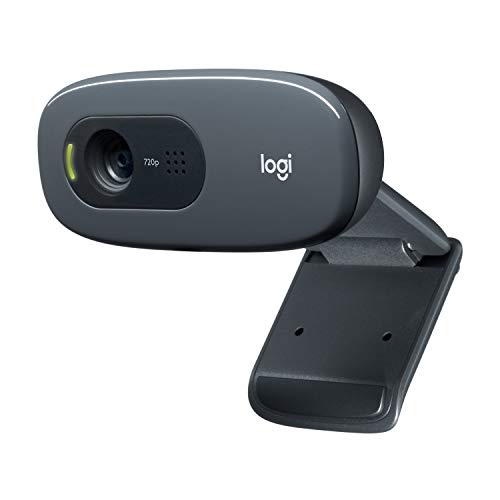
- Compatible with Nintendo Switch 2’s new GameChat mode
- Crisp HD 720p/30 fps video calls with diagonal 55° field of view and auto light correction. Compatible with popular platforms including Skype and Zoom.
- The built-in noise-reducing mic makes sure your voice comes across clearly up to 1.5 meters away, even if you’re in busy surroundings.
- C270’s RightLight 2 feature adjusts to lighting conditions, producing brighter, contrasted images to help you look good in all your conference calls.
- The adjustable universal clip lets you attach the camera securely to your screen or laptop, or fold the clip and set the webcam on a shelf. You’re always ready for your next video call.