Network Card Speeds: 1GbE vs 2.5GbE vs 10GbE
A 1GbE card fits most home internet plans, 2.5GbE runs faster over Cat5e or Cat6, and 10GbE pays off for NAS and workstation transfers.

By Andrian ChengContributing writer.
On this page

The short answer
A network card (NIC) sets the top speed of a computer's wired connection. The three common speeds for home and small office use:
- 1GbE (1 Gbps): the standard port on most PCs. Enough for most internet plans and everyday use.
- 2.5GbE: about two and a half times faster, and it runs over the same Cat5e or Cat6 cable gigabit uses.
- 10GbE: ten times gigabit. Worth it for moving large files to a NAS or between workstations, but it asks more of the cable and the switch.
Of the 1,646 network cards listed on Wiki Shopping on October 27, 2026, 214 are listed at 1 Gbps, 117 at 2.5 Gbps and 184 at 10 Gbps.
1GbE vs 2.5GbE vs 10GbE compared
All three speeds have IEEE standards for twisted pair copper cable with the familiar RJ45 plug:
| Speed | Standard | Cable for a full run | Maximum length |
|---|---|---|---|
| 1 Gbps (1000BASE-T) | IEEE 802.3ab, 1999 | Cat5 or better | 100 m |
| 2.5 Gbps (2.5GBASE-T) | IEEE 802.3bz, 2016 | Cat5e or Cat6 | 100 m |
| 5 Gbps (5GBASE-T) | IEEE 802.3bz, 2016 | Cat5e or Cat6 | 100 m |
| 10 Gbps (10GBASE-T) | IEEE 802.3an, 2006 | Cat6a | 100 m |
Cat6 can carry 10GBASE-T on shorter runs, up to 55 meters depending on the installation. The 2.5G and 5G speeds were created as a middle step because 10GBASE-T's higher signal frequency limits how far it reaches on older Cat5e cable.
To turn link speed into file transfer speed, divide by 8: 1 Gbps is at most 125 megabytes per second, 2.5 Gbps about 312, and 10 Gbps about 1,250, before network overhead. A single hard drive or a slow storage device can become the limit before a 10GbE link does.
Which speed do you need?
- Internet only: if your plan is under 1 Gbps, a gigabit card already carries all of it.
- Multi-gig internet or a fast NAS: 2.5GbE is the low cost step up, since your existing cable probably works.
- Large video or backup transfers between machines: 10GbE, with Cat6a cable (or Cat6 on short runs) and a switch with 10G ports.
Every part of the path must match. A 10GbE card plugged into a gigabit switch runs at 1 Gbps.
RJ45 or SFP+, USB or PCIe
Faster cards often use SFP+ cages instead of RJ45 ports. SFP+ is the most common socket on 10GbE gear and takes either a fiber module or a direct attach copper cable (passive cables reach 7 meters). On Wiki Shopping, 528 cards list RJ45 ports and 71 list SFP+.
How the card connects matters too: 608 cards on Wiki Shopping plug in by USB, handy for laptops, while 342 use a PCIe slot inside a desktop or server and 126 fit an M.2 slot.
How we count
Counts are the Wiki Shopping filter pages for network cards, read from our database on October 27, 2026. A card counts when its store listing states the speed, port type or connection. Cards that do not state them are left out of those counts, and the counts change as listings are added or removed.
Shop by spec
Network Cards
10 Speed, 4 Ports, PCIe, SFP+

- QUAD SFP+ ADAPTER: 4 ports on SFP+ network card can provide redundancy, or be aggregated for demanding applications; Data Center Bridging (DCB), virtualization incl. VT-c, SAN & iSCSI offload support
- TECH SPECS: 10 Gbps per port | 4 SFP+ Ports, MSA Compliant | Intel XL710| MMF & SMF Fiber Support | PCIe 3.0 x8 | PXE Boot | 9K Jumbo Frames | Link Aggregation | VLAN | Full profile | 2 Yr. Warranty
- TESTED & VERIFIED PERFORMANCE: We use Spirent SmartBits to validate performance; converged network adapter is compatible w/ leading servers like Dell PowerEdge, HPE ProLiant & Lenovo ThinkSystem
- FLEXIBLE: Use MSA compliant SFP+ module or direct attach cable (DAC) supporting different fiber types; 10 Gigabit Ethernet NIC works w/leading brands of switches, routers, & devices like Cisco & HPE
- WIDE HYPEVISOR & OS COMPATIBILITY: Fiber LAN card compatible w/Windows 7, 8, 8.1, 10; Windows Server 2008 R2, 2012, 2012 R2, 2016, 2019; Linux kernels 3.x + (LTS versions)
1 Speed

- 𝐄𝐱𝐭𝐞𝐧𝐝 𝐘𝐨𝐮𝐫 𝐄𝐭𝐡𝐞𝐫𝐧𝐞𝐭 𝐂𝐨𝐧𝐧𝐞𝐜𝐭𝐢𝐨𝐧 𝐓𝐡𝐫𝐨𝐮𝐠𝐡 𝐘𝐨𝐮𝐫 𝐄𝐥𝐞𝐜𝐭𝐫𝐢𝐜𝐚𝐥 𝐒𝐲𝐬𝐭𝐞𝐦 - This device is meant for areas where thick walls block Ethernet connections, where routers or range extenders do not work. Compatible with all TP-Link powerline adapters.
- 𝐀𝐕𝟏𝟎𝟎𝟎 𝐒𝐩𝐞𝐞𝐝𝐬 𝐔𝐩 𝐭𝐨 𝟕𝟓𝟎 𝐅𝐞𝐞𝐭 - Powered by HomePlug AV2, delivers AV1000 powerline speeds through existing electrical wiring. Speeds cannot exceed your internet plan's limit and may be lower due to wiring quality, distance, and interference.
- Ideal for multi-story homes, basements, attics, and garages.
- 𝐂𝐡𝐞𝐜𝐤 𝐛𝐞𝐟𝐨𝐫𝐞 𝐲𝐨𝐮 𝐛𝐮𝐲 - Adapters must be plugged directly into wall outlets on the same electrical circuit. Does not work with power strips, surge protectors, or extension cords. Place away from large appliances, such as washing machines, refrigerators, and air conditioners.
- 𝐀𝐝𝐯𝐢𝐬𝐨𝐫𝐲 - Performance may be limited or blocked in homes with AFCI breakers, which are standard in many homes built after 2000. Powerline may also not work with routers or gateways using modified, open-source (e.g., DD-WRT), or non-standard firmware.
- 𝐆𝐢𝐠𝐚𝐛𝐢𝐭 𝐏𝐨𝐫𝐭 - Provides secure wired networks for desktops, smart TVs or games consoles. An Ethernet cable is included.
- 𝐎𝐮𝐫 𝐂𝐲𝐛𝐞𝐫𝐬𝐞𝐜𝐮𝐫𝐢𝐭𝐲 𝐂𝐨𝐦𝐦𝐢𝐭𝐦𝐞𝐧𝐭 - TP-Link is a signatory of the U.S. Cybersecurity and Infrastructure Security Agency’s (CISA) Secure-by-Design pledge. Advanced security is integrated into the device’s design, development, and ongoing maintenance.
- 𝐏𝐥𝐮𝐠 𝐏𝐚𝐢𝐫 & 𝐏𝐥𝐚𝐲 - Set up a secure powerline network for reliable wired connections. Powerline adapters must be used in sets of two or more. No new wiring or configuration required.
- 𝐏𝐨𝐰𝐞𝐫 𝐒𝐚𝐯𝐢𝐧𝐠 𝐌𝐨𝐝𝐞 - Power saving mode automatically reduces power consumption by up to 85 percent***
- TL-PA7017 does not have Wi-Fi capabilities.
10 Speed, PCIe, RJ45
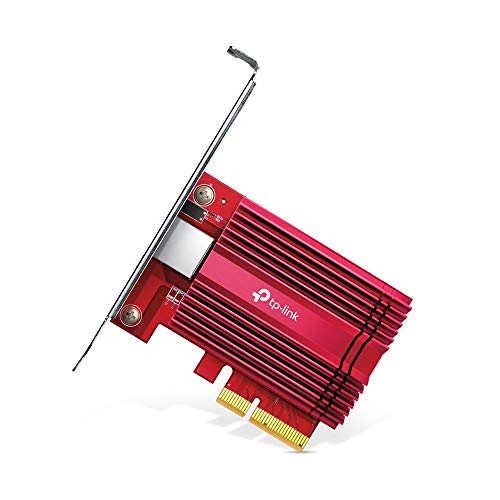
- 10 Gbps PCIe Network Card: With the latest 10GBase-T Technology, TX401 delivers extreme speeds of up to 10 Gbps, which is 10× faster than typical Gigabit adapters, guaranteeing smooth data transmissions for both internet access and local data transmissions[1]
- Versatile Compatibility: With extreme speed and ultra-low latency, 10GBase-T is backwards compatible with multiple data rates (10 Gbps, 5 Gbps, 2.5 Gbps, 1 Gbps, 100 Mbps), automatically negotiating between higher and lower speed connections
- QoS: Quality of Service technology delivers prioritized performance for gamers and ensures to avoid network congestion for PC gaming
- Free CAT6A Ethernet Cable: To maximize TX401's performance, a 1.5 m CAT6A Ethernet Cable is included-rated for up to 10 Gbps while a regular cable is only rated for 1 Gbps
- Low-Profile and Full-Height Brackets: In addition to the standard bracket, a low-profile bracket is provided for mini tower computer cases
- Comprehensive System Support - Fully compatible with Windows 10/8.1/8/7, Windows Servers 2019/2016/2012 R2, and Linux to meet your diverse operating system needs
- Industry leading 2-year warranty and free 24/7 technical support
2.5 Speed, USB, RJ45

- Faster Than Gigabit - Double the performance of a traditional Gigabit Ethernet adapter when used with switches or routers capable of 2.5Gbps. Actual speed may be affected by internet service provider, network, Ethernet cable speed, and host system
- Keep USB Universal - Hybrid 2-in-1 USB Ethernet Adapter that converts seamlessly between USB-C and USB-A, so you always have the right connection (USB 3.0 required for full performance)
- No New Cables Required - Upgrade your network without updating your cables. 2.5 Gigabit Ethernet signals are designed to work on Cat 5e cabling or better, just pair your USB C Ethernet Adapter with 2.5Gbps-capable switches/routers
- OS Compatibility -A true plug-and-play USB Ethernet adapter, it supports Windows, macOS, ChromeOS, and iOS (iPhone 15, 16, 17, 17e, Air/Pro/Pro Max on iOS 17+). Device performance may be limited by internet service provider, network and Ethernet cable speed, and host system
- 2-Year Coverage, Lifetime Support - Every Plugable product, including this USB to 2.5 Gb Ethernet Adapter, is covered against defects for 2 years and comes with lifetime support. If you ever have questions, contact our North American-based team - even before purchase