RAID Card vs HBA: Which You Need
A RAID card builds drive volumes on its own chip, while an HBA just connects drives and lets the OS or ZFS manage them; ZFS systems call for an HBA.

By Andrian ChengContributing writer.
On this page

The short answer
Both cards add drive ports to a desktop or server through a PCIe slot. The difference is who manages the drives:
- RAID card (RAID controller): its own chip groups the drives into RAID volumes and shows the computer the finished volumes, so the operating system does not build the array.
- HBA (host bus adapter): connects each drive straight through, so the operating system or storage software sees every disk and manages them itself.
If you run ZFS, for example on TrueNAS, choose an HBA. If you want the card to handle the array for an operating system that does not, a RAID card does that job.
Of the 930 RAID and HBA cards listed on Wiki Shopping on October 27, 2026, 313 are listed as HBA cards and 154 as RAID cards.
RAID card vs HBA compared
| RAID card | HBA | |
|---|---|---|
| Who builds the array | The card | The operating system or software |
| What the computer sees | Assembled volumes | Each individual drive |
| Drive health data (S.M.A.R.T.) | May be hidden behind the card | Visible to the system |
| Fits | Systems without software RAID | ZFS, TrueNAS and other software storage |
Why ZFS wants an HBA
The TrueNAS hardware guide is blunt: ZFS has its own RAID and, in its words, protects data better than any hardware RAID card. It lists the problems with putting a RAID card between ZFS and the disks:
- The card can hide disk serial numbers and S.M.A.R.T. health data.
- It can be slower than an HBA.
- A write cache with a dead backup battery can lose data.
If a RAID card offers an HBA mode (also called passthrough or JBOD), TrueNAS says to use that mode and not the card's RAID feature. As a last resort for a card without HBA mode, each disk can be set up as its own single drive RAID 0, which the guide calls not ideal.
IT mode firmware
Broadcom controllers may come with IR firmware that includes optional RAID features. For TrueNAS, the guide says to flash the latest IT (target mode) firmware, which turns those features off so the card works as a plain HBA. On Wiki Shopping, 204 listings state IT mode. TrueNAS names the 6 Gbps LSI 9211 (SAS2008 chip) as a popular choice for second hand builds, and the Broadcom 9300 and 9400 series for 12 Gbps SAS.
Ports, speed and drives
- Port count: 8-port cards are the largest group on Wiki Shopping (243), then 16-port (111).
- SAS speed: 234 cards list 12 Gb/s SAS and 129 list 6 Gb/s.
- SAS vs SATA: SAS expanders can often run SATA disks, but a SAS drive cannot be used in a port made for SATA drives. TrueNAS prefers SAS disks for their error handling and hot swapping.
- Internal or external: 328 cards have internal ports for drives inside the case; 30 have external ports for a separate drive enclosure.
How we count
Counts are the Wiki Shopping filter pages for RAID and HBA cards, read from our database on October 27, 2026. A card counts when its store listing states the type, ports, speed or feature. Listings that do not state a value are left out, and the counts change as listings are added or removed.
Shop by spec
RAID and HBA Cards
2 Drive ports, PCIe 2.0, ASM1061

- HIGH-PERFORMANCE: Add two SATA III 6Gbps ports to your desktop computer or server using a PCIe x1 slot to connect SATA drives (HDD/SSD); 2-Port SATA PCIe card features 2x SATA connections for connecting drives using SATA cables (sold separately)
- ASM1061 CONTROLLER: This PCI Express SATA 3 6Gbps card features single-chip architecture adding two SATA (serial ATA) 6Gbps ports via a single x1 PCIe slot combined total bandwidth up to 4Gbps; Supports Port Multiplier & NCQ (Native Command Queue)
- COMPATIBILITY: Supports PCIe 2.0, SATA 3.2 & AHCI 1.4 Specs, and previous gens at lower performance; Windows (7+), macOS (10.6.8+), Linux (2.6.32+); Improved motherboard compatibility with no built-in RAID; Supports ATA & ATAPI (HDD, SSD, Optical Disc)
- EASY INSTALL: Expansion card w/ plug-and-play setup in full or low-profile PCI-e slot (full-profile bracket installed, low-profile incl); Supports storage management systems such as Storage Spaces (Microsoft) , RAID Assistant (macOS), mdraid/mdadm (Linux)
6 Drive ports, PCIe 3.0, HBA, ASM1166

- HIGH-PERFORMANCE: Add six SATA III 6Gbps ports to your desktop computer or server using a PCIe x4 slot to connect SATA drives (HDD/SSD); 6-Port SATA PCIe card features 6x SATA connections for connecting drives using SATA cables (sold separately)
- ASM1166 CONTROLLER: This PCI Express SATA 3 6Gbps card features single-chip architecture adding six SATA (serial ATA) 6Gbps ports via a single x4 PCIe slot, for combined total bandwidth up to 16Gbps; Supports Port Multiplier & NCQ (Native Command Queue)
- COMPATIBILITY: Supports PCIe 3.0, SATA 3.2 & AHCI 1.4 Specs, and previous gens at lower performance; Windows (7+), macOS (10.10+), Linux (2.6.32+); Improved motherboard compatibility with no built-in RAID; Supports ATA & ATAPI (HDD, SSD, Optical Disc)
- EASY INSTALL: Expansion card w/ plug-and-play setup in full or low-profile PCI-e slot (full-profile bracket installed, low-profile incl); Supports storage management systems such as Storage Spaces (Microsoft) , RAID Assistant (macOS), mdraid/mdadm (Linux)
10 Drive ports, PCIe 2.0, ASM1062

- HIGH-PERFORMANCE: Add ten SATA III 6Gbps ports to your desktop computer or server using a PCIe x2 slot to connect SATA drives (HDD/SSD); 10-Port SATA PCIe card features 10x SATA connections for connecting drives using SATA cables (sold separately)
- ASM1062: SATA 3 6Gbps card features a single 2 port x2 PCIe Gen 2 host chip (ASM1062) & two 5-port port-multipliers (JMB575) adding 10 SATA (serial ATA) ports, for combined total bandwidth up to 8Gbps; Supports Port Multiplier & NCQ (Native Command Queue)
- COMPATIBILITY: Supports PCIe 2.0, SATA 3.2 & AHCI 1.3 Specs, and previous gens at lower performance; Windows (7+), macOS (10.10+), Linux (2.6.32+); Improved motherboard compatibility with no bifurcation required & no built-in RAID; Supports ATA & ATAPI
- EASY INSTALL: Expansion card w/ plug-and-play setup in full or low-profile PCI-e slot (full-profile bracket installed, low-profile incl); Supports storage management systems such as Storage Spaces (Microsoft) , RAID Assistant (macOS), mdraid/mdadm (Linux)
4 Drive ports, PCIe 3.0, HBA, ASM1164
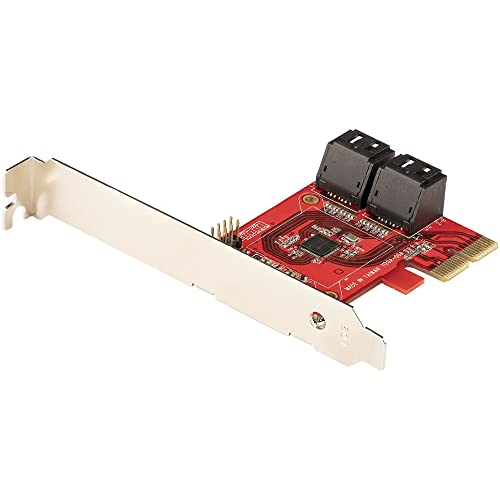
- HIGH-PERFORMANCE: Add four SATA III 6Gbps ports to your desktop computer or server using a PCIe x2 slot to connect SATA drives (HDD/SSD); 4-Port SATA PCIe card features 4x SATA connections for connecting drives using SATA cables (sold separately)
- ASM1164 CONTROLLER: This PCI Express SATA 3 6Gbps card features single-chip architecture adding four SATA (serial ATA) 6Gbps ports via a single x2 PCIe slot, for combined total bandwidth up to 16Gbps; Supports Port Multiplier & NCQ (Native Command Queue)
- COMPATIBILITY: Supports PCIe 3.0, SATA 3.2 & AHCI 1.4 Specs, and previous gens at lower performance; Windows (7+), macOS (10.10+), Linux (2.6.32+); Improved motherboard compatibility with no built-in RAID; Supports ATA & ATAPI (HDD, SSD, Optical Disc)
- EASY INSTALL: Expansion card w/ plug-and-play setup in full or low-profile PCI-e slot (full-profile bracket installed, low-profile incl); Supports storage management systems such as Storage Spaces (Microsoft) , RAID Assistant (macOS), mdraid/mdadm (Linux)