Drive Enclosures: 2.5 vs 3.5 Inch and NVMe
A drive enclosure turns an internal drive into an external one; match it to the drive's size and interface, and pick a link speed the drive can actually use.

By Paul SyversonFounder.
On this page
The short answer
A drive enclosure is a case with a small adapter board inside. You put an internal drive in it, and it connects to your computer over USB or Thunderbolt like any external drive. Three things decide which one you need:
- The drive's size and shape: 2.5 inch, 3.5 inch or an M.2 stick.
- The drive's interface: SATA or NVMe. An M.2 slot in an enclosure may take one, the other, or both.
- The link speed: how fast the cable connection runs, from 5Gbps to 80Gbps.
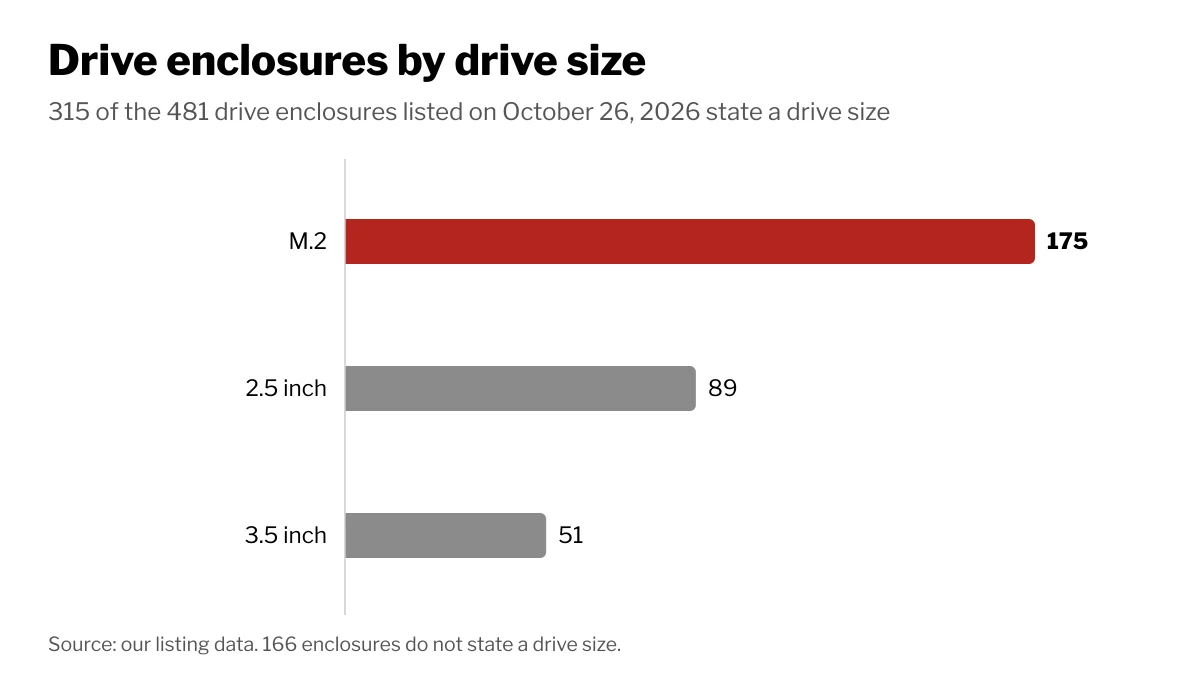
Of the 481 drive enclosures listed on Wiki Shopping on October 26, 2026, 315 state the drive they hold: 175 M.2, 89 2.5 inch and 51 3.5 inch.
2.5 inch vs 3.5 inch
The two sizes come from hard drives, and the difference that matters outside the computer is power.
| 2.5 inch | 3.5 inch | |
|---|---|---|
| Common drives | Laptop hard drives, SATA SSDs | Desktop and NAS hard drives |
| Power | Usually runs from the USB cable alone | Needs 12 V, so the enclosure comes with a power adapter |
| Typical use | Portable backup, reusing an old laptop drive | Large backups and media libraries on a desk |
A 2.5 inch drive draws so little power that most enclosures run it straight from the computer's port. Desktop 3.5 inch drives use a 12 V supply as well as 5 V, which a USB port does not provide, so plan for an outlet. A 2.5 inch SATA SSD tops out at the SATA limit of about 600 MB/s, so it gains little from a link faster than 10Gbps.
M.2 and NVMe enclosures
M.2 enclosures hold the small stick SSDs used inside current laptops and desktops. Check what the enclosure accepts: an NVMe-only model will not read an M.2 SATA drive, and the reverse is also true. On Wiki Shopping, 172 enclosures list NVMe support.
NVMe drives are where link speed matters. Wikipedia's SSD article puts NVMe sequential speeds in the thousands of megabytes per second, well past what a 10Gbps link can carry. Inside a slower enclosure, the drive still works, but at the link's speed.
Link speeds
USB-IF, the group behind USB, defines three USB 3.2 rates: 5Gbps, 10Gbps and 20Gbps (two 10Gbps lanes). USB4 runs at 20Gbps or 40Gbps and, since version 2.0, 80Gbps; Thunderbolt 4 and 5 build on those USB4 speeds.
| Link speed | Enclosures on Wiki Shopping | Good match for |
|---|---|---|
| 5Gbps | 88 | Hard drives |
| 10Gbps | 138 | SATA SSDs, everyday NVMe use |
| 20Gbps | 9 | NVMe, if your port supports 20Gbps |
| 40Gbps | 20 | Fast NVMe on USB4 or Thunderbolt |
| 80Gbps | 6 | Fast NVMe on USB4 version 2.0 or Thunderbolt 5 |
The connection runs at the speed of the slowest part: the enclosure, the cable or the computer's port. A 40Gbps enclosure plugged into a 10Gbps port runs no faster than 10Gbps, so check your computer's port first.
How we count
Counts are Wiki Shopping filter pages for drive enclosures, read from our database on October 26, 2026. An enclosure counts when its store listing states the drive size, NVMe support or link speed; listings that do not state them are left out of those counts. The counts change as listings are added or removed.
Shop by spec
Drive Enclosures
M.2, 80Gbps

- 80G Lightning Transfer Speed: This 80G enclosure is equipped with JHL9480 chip, and the actual theoretical test speed is up to 7000MB/s when it is compatible with Thunderbolt 5. It is backward compatible with Thunderbolt 4/USB4/USB3.2/3./3.0 Note:Thunderbolt 5 speed requires Thunderbolt 5 cables and interfaces
- Extreme Heat Dissipation: The product is made of aluminum, which can dissipate heat to the maximum extent when the product is running. At the same time, the built-in cooling fan can speed up the heat dissipation of the product. Note: It will only turn when the internal temperature reaches 40°C
- Universal Compatibility: This 80G ssd enclosure works best with Thunderbolt 5 ports, and is backward compatible with Thunderbolt 4/3 and USB 4/3.2/3.1. Note: Only cables and devices with Thunderbolt 5 or higher can reach 80G. Backward compatible with USB2/3. Thunderbolt 3 can only be used on computers with macOS 15 or higher
- 8TB Large Capacity Expansion Nvme Enclosure: Providing the read and write function of 8TB NVME enclosure, you no longer have to worry about memory issues.Note:The product only compatible with Windows, Linux, macOS(M5 Pro) and supports 2280 size PCIE 5.0 M.2 NVME M-KEY/(M&B)Key,not support M.2 (B-KEY) 、 (M&B)-KEY SATA NGFF SSD
- Compact & Portable: This ultra-slim aluminium external NVMe enclosure with extra silicone case is portable yet durable, and much easier to carry with this M.2 to USB adapter, making it ideal for travelling
2.5-inch, 5Gbps
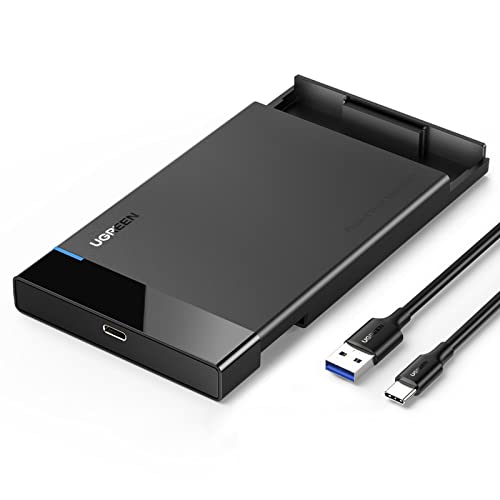
- Super Fast 6Gbps UASP: SATA interface supports max transfer speeds of up to 6Gbps and UASP accelerated transmission protocol. 70% Faster than traditional USB 3.0. Backward compatible with USB 2.0 and USB 1.1 ports.
- 2nd Gen USB 3.1 Port: Standard 2nd Gen USB C 3.1 with (7+15) Pin SATA III provides ultra-fast data transfer speeds of up to 6Gbps max. (Only USB-A to UAB-C Cable included)
- Travel-Friendly External Storage: URGREEN hard drive enclosure connects your 2.5-inch SSD&HDD to a PC, laptop, game console, or router for easy data transfer. Get protection from scratches and data storage for SATA hard drives.
- Easy Installation & Simple Design: No tools or drivers needed, simply plug and play setup. An LED indicator displays the working status. The attached EVA foam protects your hard disks from shaking and scratches. A flexible, detachable USB-C to USB-A cable (20-in) makes it easy to connect or pack away. (USB-C to USB-C cable is Not Included)
- Universal Compatibility: UGREEN Hard Drive Enclosure supports Windows, LINUX, MacOS 8.0, and above. Specifically designed for 7/9.5mm thick, 2.5 inches, 6TB HDD & SSD. Compatible with Western Digital, Seagate, Toshiba, Samsung, Kingston, Crucial, Hitachi, and more.
M.2, 40Gbps
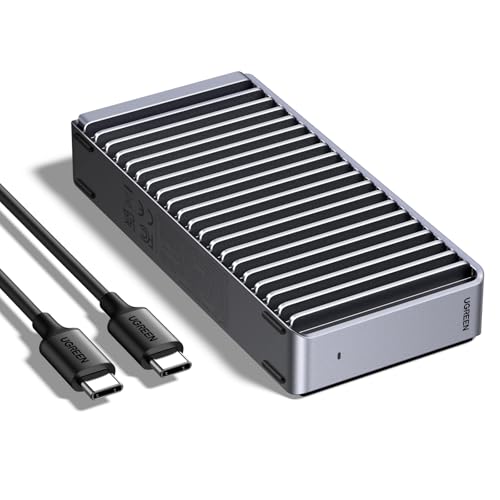
- Transmission files in seconds: This product is equipped with the ASM2464PD chip, and the maximum speed can reach 3600MB/s; compatible with USB4/3.2/3.1/3.0/2.0 & Thunderbolt 3/4.NOTE: Thunderbolt 4 cables and devices are required to achieve 3600MB/s speed
- Unique heat dissipation design: Features a unique double-sided fin design and a three-dimensional cooling system that delivers several times the heat dissipation efficiency of standard structures. Ensures quiet operation without fan noise or lifespan concerns
- Bring all your ssd types to life: It is compatible with sizes including 2230/2242/2260/2280, and it is suitable for Windows/Mac OS(Mac Mini M4/M5 Pro/M6)/Linux/Android systems (Note: It does not support SATA NGFF solid-state drives or mSATA solid-state drives
- Supports up to 8TB drives: This enclosure is compatible with drives up to 8TB, giving you ample space for work, gaming, and video playback anytime, anywhere. Note: This is a NVMe enclosure only. SSD not included.Some SSDs may be too thick, making them prone to breakage. Replacing them with thinner thermal pads will solve the problem and allow them to function normally.
- Compact & Portable: This ultra-slim aluminium external NVMe enclosure is portable yet durable, and much easier to carry with this M.2 to USB adapter, making it ideal for travelling
M.2, 40Gbps

- Superior Heat Dissipation, Keeping Cool at All Times: This NVME Enclosure features UGREEN Exclusive Triple Heat Dissipation Mechanism. The pure aluminum alloy casing provides excellent heat conductivity, while the silicone thermal pad absorbs and disperses the heat generated by the hard drive. The high-speed cooling fan accelerates the heat dissipation process, effectively reducing the hard drive temperature and improving its stability and reliability
- Intelligent Cooling, Peace of Mind in Use: This M.2 SSD Enclosure is equipped with a PWM turbo high-speed fan, which can precisely control the fan speed and automatically adjust it to maintain normal temperatures. This not only protects the hard drive but also extends its lifespan. Additionally, the fan operates at a relatively low noise level, providing you with a comfortable user experience
- Lightning Fast Transfers, Enjoy Efficient Living: With the built-in ASM2464PD chip, support for UASP acceleration protocol, and equipped with a USB4-compatible Type-C interface, this 40Gbps M.2 NVME SSD Enclosure is compatible with USB4/3.2/3.1/3.0/2.0 & Thunderbolt 3/4. Note:Thunderbolt 4 speeds require Thunderbolt 4 cables and interfaces. Other interfaces can only reach the highest speed of the corresponding interface
- Widely Compatible, Explore More Possibilities: The 40Gbps Macbook SSD Enclosure is the preferred choice for gamers, video editors, photographers, and office workers. It supports M/B+M key NVMe solid-state drives with a maximum capacity of 4TB. It is compatible with sizes including 2230/2242/2260/2280, and it is suitable for Windows/Mac OS(Mac Mini M4/M5 Pro/M6)/Linux/Android systems (Note: Does not support SSD with heatsink and M.2 PCIE 5.0 SSD)
- Self-Monitoring, Ensuring Secure and Reliable Backup: The S.M.A.R.T. technology enables timely detection of the hard drive's operational status, while the TRIM command function optimizes the performance of the solid-state drive. The USB4 NVME Enclosure facilitates self-monitoring, ensuring the security and stability of your data transfers. Additionally, the equipped silicone case effectively mitigates the impact on the hard drive enclosure