USB Cable Types: USB-A, USB-C and Speeds
The plug shape (USB-A or USB-C) and the speed (USB 2.0 up to USB 80Gbps) are separate things, so check both, plus the wattage a USB-C cable is rated for.

By Andrian ChengContributing writer.
On this page
The short answer
A USB cable has two separate traits:
- The plug. USB-A is the older, flat rectangle. USB-C is the small, oval plug that goes in either way up.
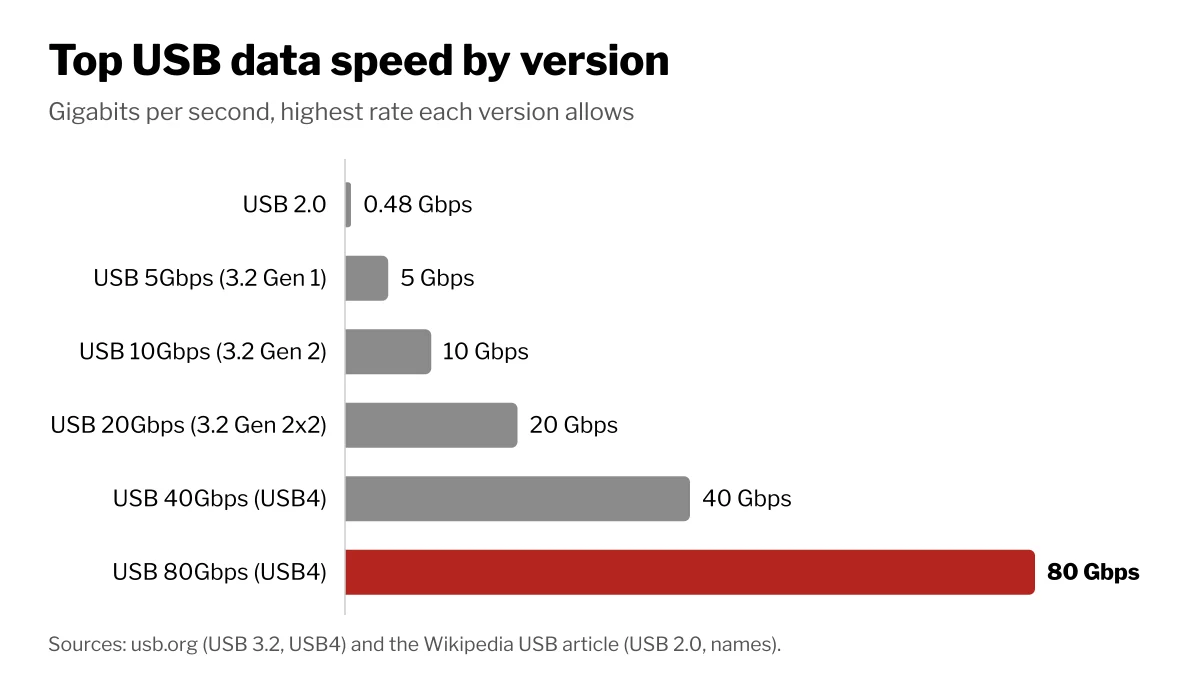
- The version, which sets the speed. It runs from USB 2.0 at 480 megabits per second up to USB4 at 80 gigabits per second.
Cables with identical plugs can differ inside. Match the cable to the fastest port you plan to use, and for charging a laptop, to the wattage you need.
USB-A vs USB-C
The USB-IF, the group behind USB, describes USB-C as a slim connector built for phones but sturdy enough for laptops and tablets, and as an alternative to the larger Standard-A and Standard-B plugs. It works in either plug orientation and either cable direction.
USB-A ports are still common on desktops, chargers and older laptops, so USB-A to USB-C cables bridge the two. The plug limits the speed, though: a USB-A connection tops out at 10 Gbps, while the faster 20 Gbps mode and USB4 work only over USB-C.
USB speeds and names
| Version | Name on newer boxes | Top speed | Plugs |
|---|---|---|---|
| USB 2.0 | Hi-Speed | 480 Mbps | USB-A, Micro, Mini, USB-C |
| USB 3.2 Gen 1 | USB 5Gbps | 5 Gbps | USB-A, USB-C |
| USB 3.2 Gen 2 | USB 10Gbps | 10 Gbps | USB-A, USB-C |
| USB 3.2 Gen 2x2 | USB 20Gbps | 20 Gbps | USB-C only |
| USB4 | USB 40Gbps | 40 Gbps | USB-C only |
| USB4 v2 | USB 80Gbps | 80 Gbps | USB-C only |
The USB 3.2 standard folds the older USB 3.0 and 3.1 names into one and sets three rates: 5, 10 and 20 Gbps. The 20 Gbps rate runs two 10 Gbps lanes at once, which USB-C cables were designed to carry. USB4 reaches up to 80 Gbps over cables certified for 80 Gbps. The "USB 10Gbps" style of naming dates from 2022, so older boxes may still say Gen 1 or Gen 2.
Everything is backward compatible: plug a fast cable into a slow device and the link runs at the lowest speed both ends support.
Charging: watts matter too
USB Power Delivery used to top out at 100 watts, which needs 20 volts and a USB-C cable rated for 5 amps. The current version allows up to 240 watts over a full-featured USB-C cable built to the newer cable rules. A cable that is fine for a phone may hold back a large laptop, so check the watt rating printed on the cable or its listing. Our guide to charger wattage covers the charger side.
How to pick a cable
- Phone charging and keyboards: a USB 2.0 cable with the right plugs is enough.
- External SSDs: match the drive's rated speed; a 20 Gbps drive needs USB-C at both ends to reach it.
- Docks and monitors: look for a USB4 cable for USB4 docks and USB-C monitors, or a Thunderbolt cable if the dock or laptop port is Thunderbolt.
- Laptop charging: pick a cable rated for at least the charger's wattage, up to 240 watts.
How we count
On October 27, 2026, Wiki Shopping listed 370 gaming cables and adapters: 219 cables and 104 adapters, with the rest not stating which. The most common stated length is 6 feet, on 30 listings. We also list 57 Thunderbolt cables. Counts come from store listings and change as listings are added or removed.