Docking Stations: USB-C vs Thunderbolt, Explained
USB-C is the plug shape, and Thunderbolt and USB4 are the links behind it; a Thunderbolt dock guarantees more bandwidth, while plain USB-C docks vary more.

By Andrian ChengContributing writer.
On this page

The short answer
A docking station connects a laptop to monitors, a wired network, a keyboard, storage and power through one cable. The question "USB-C or Thunderbolt" mixes two things:
- USB-C is the shape of the plug and port.
- Thunderbolt 4, Thunderbolt 5 and USB4 are connection standards that use that same USB-C port.
So a Thunderbolt dock and a basic USB-C dock can look identical. What differs is how much data, how many screens and how much charging power the connection guarantees. Your laptop's port sets the ceiling: check whether it carries a Thunderbolt or USB4 logo or spec before choosing.
Of the 1,372 docking stations listed on Wiki Shopping on October 27, 2026, 657 connect to the laptop by USB-C, 54 by Thunderbolt 4, 25 by Thunderbolt 5 and 15 by USB4.
Thunderbolt 4 vs Thunderbolt 5 vs USB4
Intel publishes these figures. For USB4 they are the minimum a port must meet; many USB4 ports go further.
| Thunderbolt 5 | Thunderbolt 4 | USB4 (minimum) | |
|---|---|---|---|
| Bandwidth | 80 Gbps both ways, up to 120 Gbps one way | 40 Gbps | 20 Gbps |
| Displays | Up to two 8K at 60 Hz | Two 4K at 60 Hz | One |
| Laptop charging | Up to 240 W | 100 W | Not required |
Thunderbolt 5 is compatible with earlier Thunderbolt and USB generations, but a dock can only run as fast as the laptop port it is plugged into. The USB group says USB4 is based on Intel's Thunderbolt protocol and works with Thunderbolt 3, USB 3.2 and USB 2.0 devices. Its USB4 page also cites up to 80 Gbps over cables certified for that speed.
When a USB-C dock is enough
A basic USB-C dock suits one external monitor, a few USB ports, wired Ethernet and pass-through charging. Its exact limits depend on the dock and the laptop port, so read both spec sheets for the number of displays, the resolution and refresh rate, and the charging wattage. On Wiki Shopping, 288 docks list 100 W laptop charging.
When Thunderbolt is worth it
- Two or more high resolution monitors: Thunderbolt 4 guarantees two 4K screens at 60 Hz. On Wiki Shopping, 156 docks drive two external displays and 126 drive three.
- Fast external storage or high refresh screens: the extra bandwidth of Thunderbolt 5 keeps several fast devices running at once.
- Power hungry laptops: Thunderbolt 5 allows up to 240 W of charging.
Dock or hub?
A hub is the simpler option: it adds a few ports through one plug. A full dock adds more ports and, when it has its own power adapter, can also charge the laptop. On Wiki Shopping, 568 listings are full docking stations and 436 are USB hubs.
How we count
Counts are the Wiki Shopping filter pages for docking stations, read from our database on October 27, 2026. A dock counts when its store listing states the connection, type, charging power or display count. Listings that do not state them are left out, and the counts change as listings are added or removed.
Shop by spec
Docking Stations
Docking station, USB-C, 1 Ethernet speed
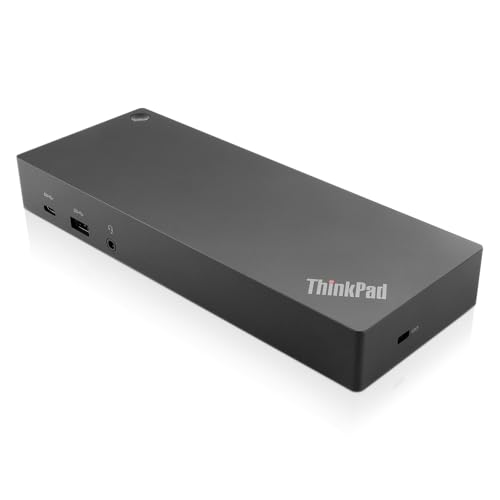
- USB Ports: 3x USB 3.1 gen2 (10Gbps, 1x always-on USB charging); 2x USB2.0; 1x USB-C port (Data,5V 3A power).
- Ports: 1x Gigabit Ethernet; 2x Display Port; 2x HDMI Port; 1x Stereo/Mic Combo Audio Port.
- Enterprise-class universal docking. Supports ThinkPad RapidCharge. Works with older Lenovo and non-Lenovo laptops.
- Can charge mobile devices with 15W and 10.5W from USB-C port and USB3.0 always power-on port respectively.
- Compatibility: E580, E480, E470, L580, L480, L470, L380, L380 Yoga, Lenovo Tablet 10, Miix 520-12IKB, T580, T570, T480, T480s, T470, T470s, T460, ThinkPad 25, X1 Carbon Gen 6, X1 Carbon Gen 5, X1 Yoga Gen 3, X1 Yoga Gen 2, X1 Tablet Gen 3, X1 Tablet Gen 2, 13 Gen 3 Windows, X280, X270, X260.
USB-C, 4K, 6 Ports

- Fully Functional USB-C: Harness the speed and reliability of USB-C. This dock amps up your data transfer rates, charging capabilities, and display options, ensuring your gaming rig runs at peak efficiency with zero lag. OS requirements - Windows 11
- All-In-One Connectivity: Amplify your gaming setup with an array of port options. From connecting extra screens to maintaining a stable Ethernet connection, this dock eliminates cable chaos and offers unparalleled performance with seamless port expansion
- Crystal-Clear 4K Visuals: Step into visually stunning worlds with 4K support at 60Hz. Experience every game with extraordinary clarity and sharpness, making your on-screen adventures more lifelike and engaging
- Legion Go Gaming Accessory: This dock transforms your Legion Go console, delivering a seamless and exhilarating gaming experience. Whether you’re powering up your console, sharing epic gameplay in ultra-high-definition, or ensuring stutter-free performance with reliable Ethernet, this dock has got your back
- Space-Saving Elegance: In addition to its outstanding functionality, our 6-in-1 portable docking station boasts a slim and stylish design. It takes up minimal space so you can set up and play wherever you go
Docking station, USB-C, 2 External displays, 4K

- Massive Expansion: Expand your MacBook's 2 USB-C ports into 1 multi-function USB-C port, 1 USB-C data port, 2 USB-A ports, 1 HDMI port, 1 SD card slot, and 1 microSD card slot-all from one ultra-compact hub.
- High-Speed, High-Def: A multi-function USB-C port supports huge charging power up to 100W, data transfer up to an astounding 40 Gb/s, and media display at resolutions up to 5K.
- Multi-Monitor Display: The HDMI port supports a resolution of 4K@60Hz while the multi-function port supports 5K@60Hz. Connect to both simultaneously to enjoy crystal-clear streaming or mirroring across 2 displays. Note: M1, M2 and M3 MacBooks do not support dual external display.
- Designed for the Latest MacBooks: Works with the latest MacBook Air and MacBook Pro, and is designed specially to avoid obstructing your MacBook's MagSafe port. Note: this hub is not compatible with MacBook Neo.
- What You Get: Anker 547 USB-C Hub (7-in-2, for MacBook), welcome guide, worry-free 18-month warranty, and friendly customer service.
Docking station, USB-C, 2 External displays, 4K

- 10-in-1 USB C Docking Station: Inspire more potential of your laptop's USB-C port with 2xHDMI ports, a 100W USB-C PD port, a 5Gbps USB-C port, a USB A 3.0, 2xUSB A 2.0, RJ45 and SD/Micro SD card reader
- Dual 4k@60Hz/Single 8K@30Hz HDMI Docking Station: The Docking Station allows you to connect two displays up to 4K@60Hz or a single screen up to 8K@30Hz via the HDMI 2 connector. Please note that dme to macOS limitations, all docking displays will display the same content when connected to a MacBook
- High-Speed Data Transfer: Connecting keyboards, transfer files, movies, and photos at speeds up to 5Gbps via the USB-C data port and USB-A ports. Note: The USB A and C ports do not provide charging capabilities or video output
- 100W Power Delivery: The Laptop docking station Supports up to 85W USB C pass-through charging via USB-C PD port, reserves 15W for other interface operation. Additionally, the port only supports charging; it does not facilitate data transfer or video output
- Docking Station Card Reader & Ethernet Combo: The USB-C Hub Docking Station Combo has a 1000Mbps Ethernet port that gives you the advantage of ultra-high-speed internet connections.Equipped with SD/TF card reader to solve your card reading needs