Chromebook vs Laptop and Update Dates, Explained
A Chromebook is a laptop that runs Google's ChromeOS instead of Windows or macOS, works through web and often Android apps, and gets updates to a listed date.

By Liam McCabeContributing writer.
On this page
The short answer
A Chromebook is a laptop. The difference is the operating system: it runs Google's ChromeOS rather than Windows or macOS. Most of the work happens in the Chrome browser and in web apps, so a Chromebook fits people who mostly browse, stream, write and use online tools. If you need a specific Windows or Mac program, check that it has a web or Android version before you buy.
The other thing to check is the update date. Every Chromebook model stops getting software updates on a date Google publishes in advance.
What a Chromebook can run
- Web apps: anything that runs in the Chrome browser.
- Android apps: Google's help page says you can install apps from the Google Play Store, but only some Chromebooks support it. If the Play Store option is missing in Settings, that model cannot run Android apps. Work and school Chromebooks may also block it.
- Linux: Google describes Linux on a Chromebook as a feature for developing software: command line tools, code editors and IDEs. Work or school devices might not allow it.
Google's help pages do not describe running Windows or Mac programs on a Chromebook.
Update dates: the "Automatic updates until" date
Google's ChromeOS device list says ChromeOS devices receive 10 years of updates, counted from the platform release date, not from the day you buy. Because the clock starts at release, a model that has been on sale for a while has fewer years left. Google lists an "Automatic updates until" month for each approved model and advises checking it before buying. Some models are marked as needing to opt in to extended updates.
To see the date on a Chromebook you already own, Google gives these steps:
- Select the time in the bottom right corner, then open Settings.
- Select About ChromeOS.
- Select Additional details and look at "Update schedule."
After the final update, the device stops getting ChromeOS and browser updates, including security fixes. Some apps that need newer versions may stop working. Google notes that a maker's end of sale date is a separate thing from the update date.
Chromebook Plus
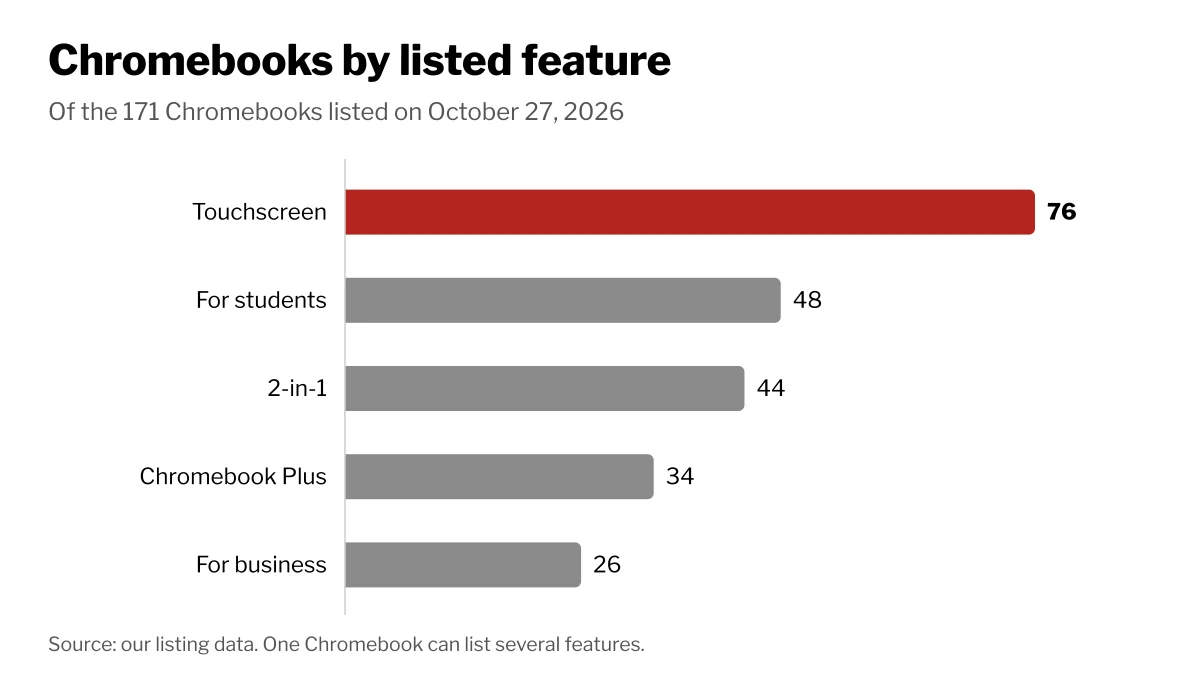
Chromebook Plus is a label Google gives to models with more memory and storage. Google's Chromebook Plus page states 8GB or more of RAM and 128GB or more of storage. Of the 171 Chromebooks listed on Wiki Shopping on October 27, 2026, 34 carry the Chromebook Plus label.
What to compare when you shop
| Spec | What to look for |
|---|---|
| Update date | The later the "Automatic updates until" month, the longer the support |
| RAM | 110 Chromebooks on Wiki Shopping list 4GB or less; 43 list 6GB to 8GB |
| Storage | eMMC is the most common type (92 listings); 23 list an SSD |
| Screen | 83 list a 14 inch screen; 98 list Full HD or higher |
| Form | 44 are 2-in-1 models that fold into a tablet |
Storage sizes on Wiki Shopping listings run from 32GB or less (33 listings) and 64GB (87) up to 128GB (37) and 256GB (14). Compare the update date first, then RAM and storage, since a low price on an older model can mean fewer years of updates.
How we count
RAM, storage, screen and features are read from each Chromebook's store listing on Wiki Shopping. Listings that do not state a spec are left out of that count, and a listing can show several features at once. The counts change as listings are added or removed.
Shop by spec
Chromebooks
6 to 8 GB, 64 GB, Intel N-series
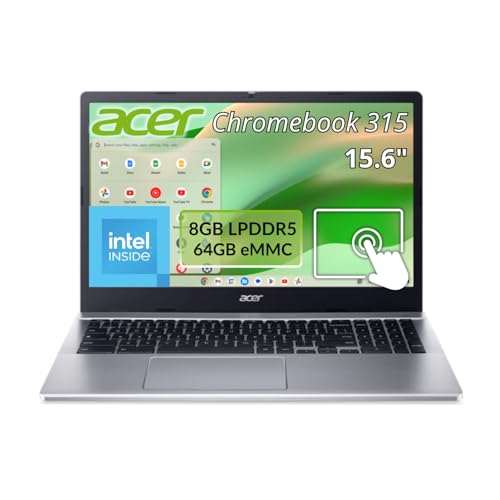
- Intel N-Series processors enable notebooks to run everyday tasks efficiently with low power draw and extended battery life
- The 15.6 inch 1920 x 1080 screen delivers an exceptional viewing experience, featuring vibrant colors, sharp resolution, and wide viewing angles
- 12 Hours battery run time allows you to stay untethered and productive for extended periods without interruption
- ChromeOS delivers fast access to web apps and Android tools, suitable for students, educators, and mobile-first professionals
- 8 GB memory is ready to run powerful programs with efficient multitasking, allowing seamless transitions between tasks
- Touchscreen Display: Interactive 15.6-inch Full HD touchscreen with IPS technology and ComfyView matte finish for reduced glare and enhanced usability
- Connectivity Options: IEEE 802.11ax wireless LAN standard provides fast and reliable wireless connectivity for seamless online experience
- Storage Capacity: 64 GB flash memory provides ample space for storing documents, media files, and applications with quick access speeds
14 in, 4 GB or less, 128 GB, Intel N-series
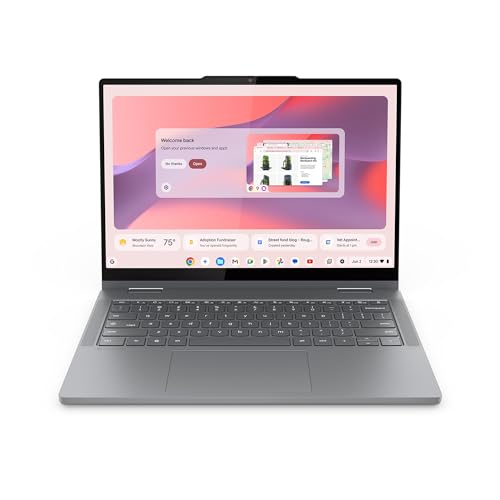
- THE BETTER WAY TO LAPTOP – Imagine a Chromebook that’s as flexible as your day: thin and lightweight with built-in Google apps and stress-free security.
- TAKE HITS KEEP MOVING – Sleek, light, and built to last- the Chromebook 2-in-1 is just 0.69” thick and 3.3lbs. Enjoy long-lasting battery life, fast charging, and military-grade durability for nonstop productivity wherever life takes you.
- PERFORMANCE THAT MATCHES YOUR HUSTLE – Fuel your ideas with an Intel Core processor and 128GB storage. Boot up in under 10 seconds to start the day powerfully efficient.
- FLEX YOUR CREATIVITY ANYWHERE, ANYTIME – Create, work, or unwind your way with a versatile 2-in-1 design. Flip easily between laptop, tent, and tablet modes with a responsive touchscreen built for flexibility.
- BRILLIANT VIEWS AND IMMERSIVE AUDIO – See, hear, and create with awesome clarity. The WUXGA display brings rich detail to your work and play, while audio tuned by Waves MaxxAudio provides immersive, balanced sound.
- MORE WAYS TO CONNECT AND CREATE – Stay connected and ready for just about anything. With two USB-C ports, two USB-A ports, and an HDMI port, the Chromebook 2in1 makes it easy to plug in, share, and expand your setup wherever, whenever.
- LOOK SHARP AND STAY SECURE – Take control of your privacy anywhere with a physical shutter on the crisp FHD webcam. Open it confidently for video calls, meetings, or live streams, and slide it securely closed whenever you need complete peace of mind.
- BUILT-IN GOOGLE AI, WITH GEMINI – Chat with Google Gemini to supercharge your ideas, right from your home screen. Get help planning, writing, learning, and more.
15 in or more, 6 to 8 GB, 128 GB, Intel N-series

- Processor: Intel Processor N50, Up to 3.4 GHz
- Screen: 15.6 inch(1920 x 1080) Full HD AntiGlare Touchscreen Display
- Ports: 2 x USB-C 3.2 Gen1, 2 x USB-A 3.2 Gen1, 1x HDMI output, and headphone jack
- Operating System: Chrome OS
- RAM: 8GB DDR5; Storage: 128GB eMMC
14 in, 6 to 8 GB, 256 GB, Full HD or higher

- THE BETTER WAY TO LAPTOP – Imagine a Chromebook that’s as flexible as your day: thin and lightweight with built-in Google apps and stress-free security.
- TAKE HITS KEEP MOVING – Sleek, light, and built to last- the Chromebook Plus 2-in-1 14" is just 0.69” thick and 3.3lbs. Enjoy long-lasting battery life, fast charging, and military-grade durability for nonstop productivity wherever life takes you.
- PERFORMANCE THAT MATCHES YOUR HUSTLE – Fuel your ideas with an Intel Core processor and 8GB memory. Boot up in under 10 seconds to start the day powerfully efficient.
- FLEX YOUR CREATIVITY ANYWHERE, ANYTIME – Create, work, or unwind your way with a versatile 2-in-1 design. Flip easily between laptop, tent, and tablet modes with a responsive touchscreen built for flexibility.
- BRILLIANT VIEWS AND IMMERSIVE AUDIO – See, hear, and create with awesome clarity. The WUXGA display brings rich detail to your work and play, while audio tuned by Waves MaxxAudio provides immersive, balanced sound.
- MORE WAYS TO CONNECT AND CREATE – Stay connected and ready for just about anything. With two USB-C ports, two USB-A ports, and an HDMI port, the Chromebook Plus 2-in-1 14" makes it easy to plug in, share, and expand your setup wherever, whenever.
- LOOK SHARP AND STAY SECURE – Take control of your privacy anywhere with a physical shutter on the crisp FHD webcam and fingerprint reader. Open your Chromebook with the touch of a finger for video calls, meetings, or live streams, and slide the webcam shutter securely closed whenever you need complete peace of mind.
- BUILT-IN GOOGLE AI, WITH GEMINI – Chat with Google Gemini to supercharge your ideas, right from your home screen. Get help planning, writing, learning, and more.