DDR4 vs DDR5 RAM: Speed, Latency and Fit
DDR5 runs at higher transfer rates and lower voltage than DDR4, but the two are not interchangeable; your motherboard and CPU decide which one you can use.

By Paul SyversonFounder.
On this page
The short answer
DDR5 is the newer generation of desktop and laptop memory. It moves more data per second than DDR4 and runs at a lower voltage. But you cannot choose freely: a DDR5 stick has a different pin layout and will not work in a DDR4 motherboard, and the reverse is also true. Check your motherboard's memory specification first, then buy that type.
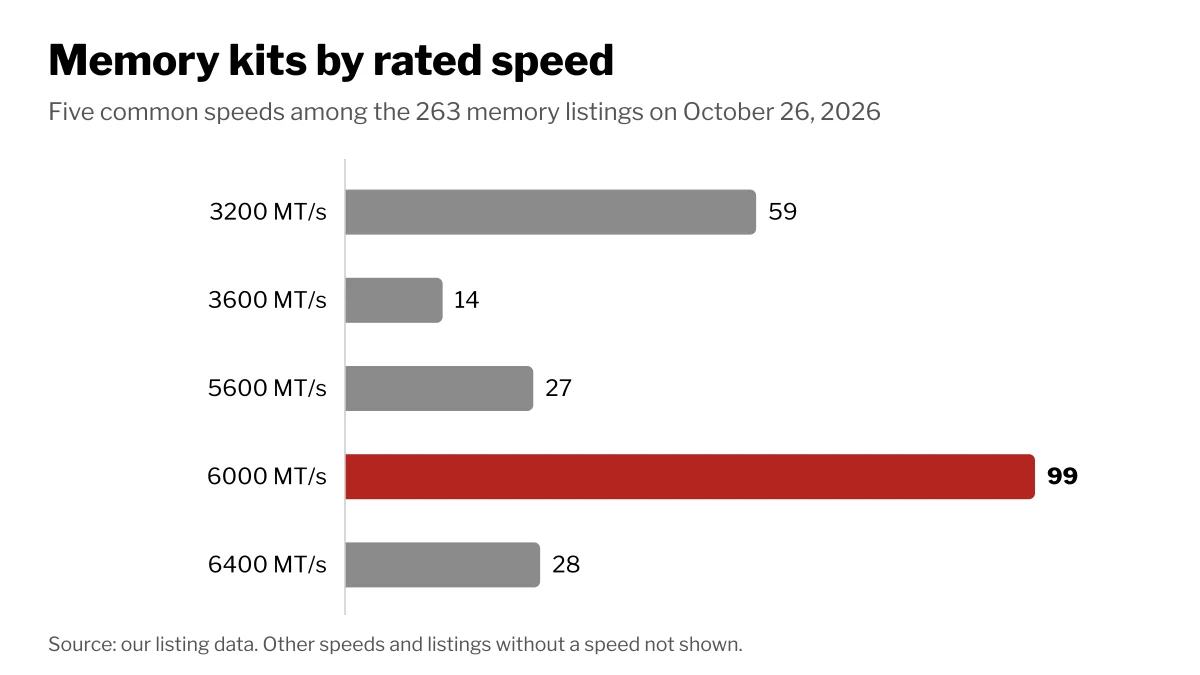
Of the 263 memory listings on Wiki Shopping on October 26, 2026, 248 state a generation: 161 DDR5 and 87 DDR4.
DDR4 vs DDR5 at a glance
| DDR4 | DDR5 | |
|---|---|---|
| JEDEC standard speeds | 1600 to 3200 MT/s | 4000 to 6400 MT/s |
| Voltage | 1.2 V | 1.1 V |
| Channels per stick | One | Two independent 32-bit subchannels |
| Power regulation | On the motherboard | On the stick (PMIC) |
| Error correction inside the chips | No | Yes (on-die ECC) |
| Largest stick in the standard | 64 GB | 512 GB |
| Desktop pins | 288 | 288 |
Figures are from Wikipedia's DDR4 and DDR5 articles. Both use 288 pins on a desktop stick, yet they do not fit each other's slots; Corsair puts it down to the different pin layout.
On-die ECC fixes errors inside each chip, but it is not the same as true ECC memory, and it does not report the errors it corrects.
Speed vs latency
Speed in MT/s (million transfers per second) is how much data the memory can move. CAS latency (CL) is how many clock cycles it waits before answering. A higher CL is not automatically slower, because each cycle is shorter at a higher speed.
To compare kits, convert to nanoseconds: 2,000 times CL divided by the speed in MT/s. Wikipedia's CAS latency table shows why the generations come out close:
| Kit | First word latency |
|---|---|
| DDR4-3200 CL16 | 10.00 ns |
| DDR5-6000 CL30 | 10.00 ns |
| DDR5-6000 CL26 | 8.67 ns |
| DDR5-6000 CL40 | 13.33 ns |
So a common DDR5-6000 CL30 kit answers as fast as DDR4-3200 CL16 and moves almost twice the data per second.
What is common on Wiki Shopping
DDR4 kits rated above 3200 MT/s, like 3600, go past the JEDEC standard rates. Kits like these carry preset profiles: 105 list Intel XMP and 86 list AMD EXPO. Corsair notes that DDR5 uses XMP 3.0 and DDR4 uses XMP 2.0.
For capacity, 32GB leads with 132 listings, and most listings (205) are two-stick kits.
Which one to buy
- Building a new desktop: your processor and motherboard choice decides. A board takes one generation, so buy the one it lists.
- Upgrading an existing PC: buy the type your motherboard already uses. A DDR4 board needs DDR4.
How we count
Counts are Wiki Shopping filter pages for memory, read from our database on October 26, 2026. A listing counts when its store listing states the generation, rated speed, capacity, stick count or profile; listings that do not state them are left out of those counts. The nanosecond figures come from Wikipedia's CAS latency table.
Shop by spec
Memory
DDR4, 16GB, 1 Sticks, 3200 Speed
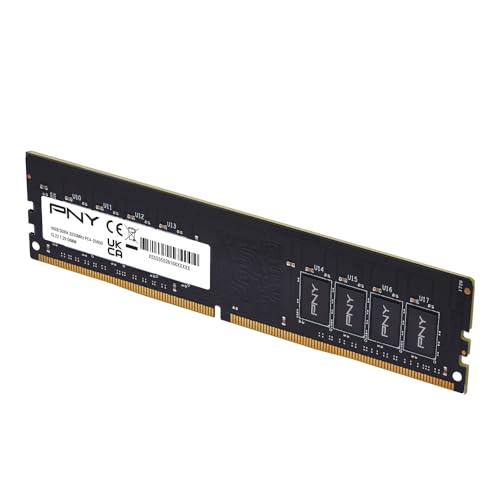
- Experience the benefits of a PC Memory Upgrade with the ability to run more demanding applications simultaneously, and at faster speeds, for a better, smoother, computing experience
- High performance DDR4 Desktop Memory designed for PC enthusiasts and gamers
- Exceptional performance with a frequency speed of 3200MHz (PC4-25600), and backwards compatible with lower frequencies (3000MHz, 2933MHz, 2666MHz, 2400MHz and 2133MHz)
- CAS Latency of 22, 1.2 Volts
DDR4, 32GB, 2 Sticks, 3200 Speed

- Disclaimer: Maximum Speed requires overclocking/PC BIOS adjustments. Maximum speed and performance depend on system components, including motherboard and CPU
- Hand-sorted memory chips ensure high performance with generous overclocking headroom
- VENGEANCE LPX is optimized for wide compatibility with the latest Intel and AMD DDR4 motherboards
- A low-profile height of just 34mm ensures that VENGEANCE LPX even fits in most small-form-factor builds
- A solid aluminum heatspreader efficiently dissipates heat from each module so that they consistently run at high clock speeds
DDR4, DIMM, 32GB, 2 Sticks

- * Requires overclocking/BIOS adjustments. Maximum speed and performance depends on system components, including motherboard and CPU.
- G.SKILL Trident Z RGB Series DDR4 U-DIMM Memory Kit, Model: F4-3200C16D-32GTZR
- Non-ECC, DDR4 U-DIMM, 288-pin, for Desktop PC & Gaming
- Includes JEDEC default profile, and Intel XMP memory overclock profile
- Do not mix memory kits. Memory kits are sold in matched kits that are designed to run together as a set. Mixing memory kits will result in stability issues or system failure.
- Refer to G.SKILL memory QVL or RAM Configurator tool on the G.SKILL website for more details on validated motherboard and hardware.
- Usage in any manner inconsistent with manufacturer specifications, warnings, designs, or recommendations will result in lower speeds, system instability, or damage to the system or its components.
- Memory kits will boot at JEDEC default SPD speed at default BIOS settings with compatible hardware.
- Visit the G.SKILL warranty policy webpage for more details.
DDR5, DIMM, 16GB, 1 Sticks

- 16GB(1 x 16GB) 5600MT/s Module
- Feature Overclock: XMP 3.0 & EXPO overclocking supported
- Compatibility: Tested across latest DDR5 platforms for reliability on high performance
- Aluminum heat spreader with unique and specific design element
- On-Die ECC