How to Choose a Desktop Computer
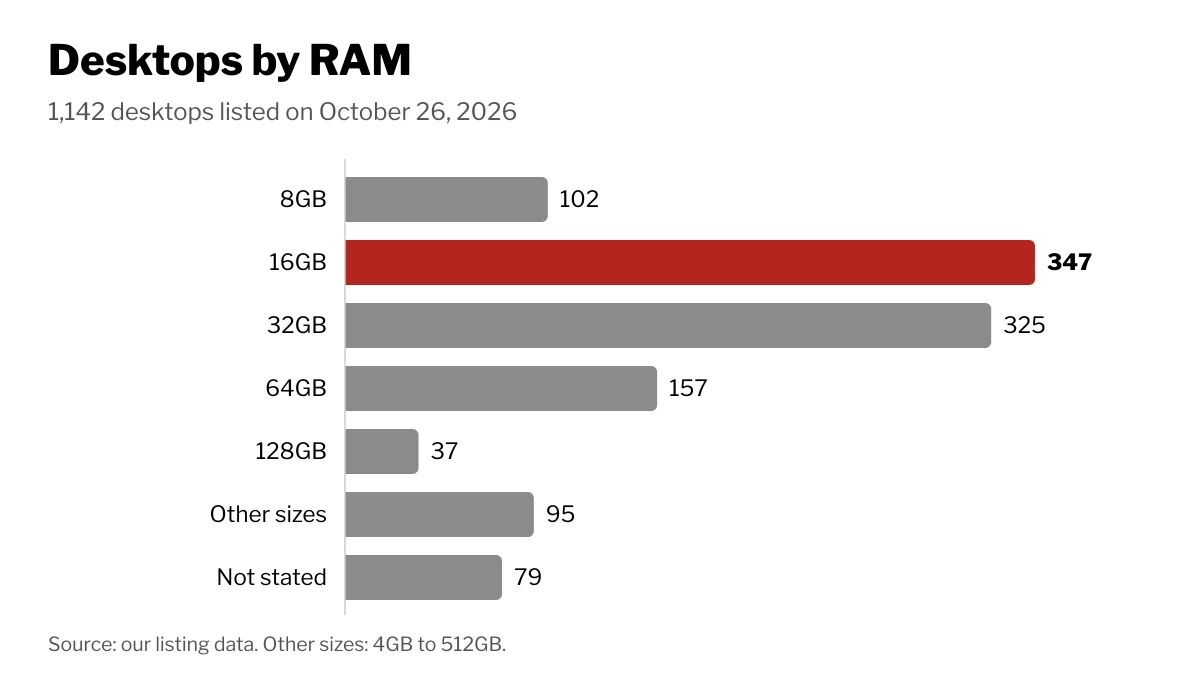
Pick the case style first (tower, compact or all-in-one), then match CPU, RAM, storage and graphics to your heaviest task; 16GB is our most common RAM size.

By Paul SyversonFounder.
On this page
The short answer
Choose a desktop in two steps. First pick the shape: a full-size tower, a compact case, or an all-in-one with the screen built in. Then match the parts inside to the heaviest thing you will ask it to do.
Of the 1,142 desktops listed on Wiki Shopping on October 26, 2026, the most common RAM size is 16GB (347 desktops), followed closely by 32GB (325).
Tower, compact or all-in-one
ENERGY STAR's buying guide sums up the three styles:
| Style | Good at | Trade-off |
|---|---|---|
| Full-size tower | Lowest cost, easiest to upgrade and repair, most options | Takes room on or under the desk; needs a separate monitor |
| Compact | Fits small spaces | Harder to upgrade and repair |
| All-in-one | Screen and computer in one case, few cables | Costs more; tightly packed parts are hard to upgrade or repair |
If you expect to add a graphics card, more storage or more memory later, a tower keeps those doors open. If desk space matters more, an all-in-one or a mini PC may suit you better. On Wiki Shopping, 291 desktops list an all-in-one screen size.
The parts that matter
- Processor (CPU). It does the general work. More cores and higher clock speeds help with video exports, code builds and many open apps.
- Memory (RAM). Windows 11 needs at least 4GB to install, and Microsoft's Copilot+ PC class needs 16GB of DDR5 or LPDDR5. On Wiki Shopping, 572 desktops list DDR5 memory and 137 list DDR4.
- Storage. An SSD makes the system start and load apps quickly. Windows 11 asks for at least 64GB, but your files, games and apps add far more.
- Graphics. Integrated graphics share the processor and handle everyday work. A dedicated graphics card helps with gaming, 3D and some AI tools; 501 desktops on Wiki Shopping list one.
- Connections. Check the ports you need, and whether Wi-Fi is built in. 590 desktops on Wiki Shopping list Wi-Fi.
Windows 11 Home or Pro
Store listings name the Windows edition. On Wiki Shopping, 542 desktops come with Windows 11 Pro and 285 with Windows 11 Home. If the computer will join a workplace network, ask which edition your employer needs before you buy.
How much power a desktop uses
There is no single wattage, because use depends on the parts and on how long the computer runs and sleeps. The U.S. Department of Energy's purchasing guide, based on ENERGY STAR data from December 2024, gives yearly energy use for a common desktop type:
| Desktop | Energy per year | Cost per year |
|---|---|---|
| Most efficient listed model | 12 kWh | about $1 |
| ENERGY STAR level | 52 kWh | about $6 |
| Least efficient in the market data | 208 kWh | about $23 |
Those costs assume 11 cents per kWh. ENERGY STAR says certified computers use about 30 to 40 percent less energy than standard models, and turning on sleep settings saves more. A plug-in power meter shows what your own machine draws.
How we count
Each desktop's specs are read from its store listing. Desktops whose listing gives no RAM size are counted as "Not stated". The counts change as listings are added or removed.
Shop by spec
Desktops
Intel Core i3-N305, 8GB RAM, 512GB Storage, Windows 11 Home

- 🚀 Reliable Everyday Performance: Powered by the Intel N100 processor (4 cores, 4 threads, up to 3.4GHz with 6MB Intel Smart Cache) and integrated Intel UHD Graphics, this Lenovo V100 handles web browsing, office tasks, and media playback smoothly. Backed by 8GB DDR5 memory and a fast 512GB PCIe NVMe SSD, it delivers responsive day-to-day computing on Windows 11 Home right out of the box.
- 🖥️ Space-Saving Display in a Clean Design: Work comfortably on a 23.8" FHD (1920x1080) IPS anti-glare display with 250 nits brightness and 99% sRGB color accuracy. The Eclipse Black finish and adjustable tilt stand bring a sleek, professional look to any desk, while the all-in-one form factor eliminates bulky tower clutter for home or office use.
- 🎤 Ready for Video Calls and Media: Stay connected on virtual meetings with the built-in HD camera and mono microphone, while 2W x2 speakers deliver clear audio for calls and everyday media. A USB wired keyboard and USB wired mouse in matching black are included, so you can set up and start working immediately.
- 📶 Dependable Wired and Wireless Connectivity: Stay online with Intel Wi-Fi 6 AX203 and Bluetooth 5.2, plus integrated 100/1000M Ethernet for stable wired networking. A versatile port selection includes two USB-A 10Gbps ports, two USB-A 2.0 ports, HDMI-out, Ethernet, and a headphone/microphone combo jack to connect your peripherals and displays with ease.
- 🔒 Built-In Security and Eco-Friendly Design: Protect your data with a firmware TPM 2.0 chip integrated into the SoC and a Kensington Security Slot for physical protection. This Lenovo V100 is backed by GREENGUARD certification and Low Halogen compliance, making it a dependable and environmentally conscious choice for home or office computing.
Intel Core Ultra 7 265KF, GeForce RTX 5060 Ti, 32GB RAM, 2TB Storage

- Intel Core Ultra 7 265KF, Intel B860 Chipset Motherboard, 32GB DDR5 6000MT/s RGB Memory, 2TB NVMe M.2, WiFi
- NVIDIA GeForce RTX 5060 Ti 8G, Display Port/HDMI
- Closed Loop Liquid Cooling with 240mm Radiator
- 1x USB 3.0, 2x USB 2.0, 1x Headphone, 1x Mic Ports
- Full Length PSU Power cover cleans up cables for a professional look.
AMD Ryzen 5 7430U, 16GB RAM, 512GB Storage, Windows 11 Home

- Uncompromising Performance: The AMD Ryzen 5 7430U processor and AMD Radeon Graphics distribute performance where you need it most. With 16 GB DDR4 memory and 512 GB PCIe SSD storage-the Aspire C27 is made to do it all.
- Display and Comfort: The brilliant 27" FHD IPS display with 120 Hz refresh rate boasts narrow bezels and a 90.71% screen-to-body ratio. It’s also featuring Acer VisionCare technology providing flicker less technology, BluelightShield and low dimming for comfortable viewing.
- Smooth Visuals: The 120Hz refresh rate speeds up the frames per second to deliver ultra-smooth 2D motion scenes. With a rapid refresh rate of 120Hz, our monitors shorten the time it takes for frame rendering, lower input lag and provide gamers an excellent in-game experience
- Stay Connected: Experience ultra-fast, stable connectivity with Wi-Fi 6E, along with Display Port, HDMI, USB Type-C, a headphone jack and plenty of USB Type A ports.
- Easy Access: Experience unparalleled convenience with front I/O access on your All-in-One (AIO) system. Swiftly connect peripherals, charge devices, and access audio inputs without reaching behind your desktop. Simplify your workspace and enhance accessibility.
- Video Calling with Privacy: Video calling has never been more important. With the 2.0MP webcam and two microphones, stay connected with friends and family as if they were there. Additionally, keep family life private with the convenient webcam cover for peace of mind.
- AMD Ryzen 5 7430U Hexa-Core Processor (Up to 4.3 GHz) | AMD Radeon Graphics | 27" Full HD Widescreen IPS LED Display (120 Hz Refresh Rate, 16:9 Aspect Ratio) | 16 GB DDR4 3200MHz SO-DIMM Memory | 512 GB PCIe NVMe SSD
- Wi-Fi 6E supports dual-stream Wi-Fi in the 2.4GHz, 5GHz and 6GHz bands| Bluetooth 5.2 | 2 MP (1920 x 1080) Webcam with 2 Microphones and Privacy Shutter
- 1 - USB 2.0 Type C port (Front)| 3 - USB 2.0 Type A ports (1 x Front and 2 x Rear) | 2 - USB 3.2 Gen2 10Gbps Type A port (Rear) | 1 - DisplayPort out (Rear) | 1 - HDMI 1.4b out (Rear) | 1 - Ethernet RJ-45 Port (Rear) | 1 - Combo Audio Jack (Front)
- USB Keyboard and Mouse Included | AI assistance of Copilot in Windows using the dedicated One-Click Copilot Key | Comes with Windows 11 Home
512GB Storage, Windows 11 Pro
 HP Z8 Fury G5 Workstation - 1 x Intel Xeon w5-3535X - 16 GB - 512 GB SSD - Tower - Black - Smart Buy - Intel W790 Chip
- AI-powered: Yes
- Number of Processors Supported: 1
- Number of Processors Installed: 1
- Processor Manufacturer: Intel
- Processor Type: Xeon