Mouse DPI Explained: What Setting to Use
DPI sets how far the cursor moves per inch of mouse travel; at 800 DPI one inch moves it about 800 pixels, and most gamers play at 400 to 3,600.

By Paul SyversonFounder.
On this page
The short answer
DPI (dots per inch) is a mouse's sensitivity: how far the cursor moves on screen for each inch the mouse moves on your desk. SteelSeries, which calls the same figure CPI (counts per inch), gives this example: at 800, one inch of mouse movement moves the cursor 800 pixels. Double the DPI and the same hand movement covers twice the distance.
A higher DPI is not better by itself. It only changes the ratio between your hand and the cursor, and you choose the setting that feels right.
What DPI is good for gaming
SteelSeries suggests starting at 800 DPI and adjusting from there. It says most settings fall between 400 and 3,600, and most gamers land between 800 and 2,400:
| Sensitivity | DPI range | Suits |
|---|---|---|
| Low | 400 to 1,200 | Precise aiming where an overshoot costs you |
| Medium | 800 to 2,400 | Moving between most multiplayer games |
| High | 2,400 to 3,600 | Fast flick shots, once you are used to it |
Shooters lean low. SteelSeries lists 400 to 800 DPI for Counter-Strike 2 and Rainbow Six Siege and 400 to 1,600 for Valorant. Low DPI means bigger arm movements for small, controlled cursor moves.
SteelSeries also names screen resolution as a factor: on a higher resolution monitor the cursor has more pixels to cross. You do not have to pick one value. Logitech's G900 software, for example, stores up to five levels from 200 to 12,000 in steps of 50, and buttons on the mouse switch between them.
Maximum DPI on the box
Maximum DPI is the top of the range, not a setting you need to use. Razer rates its DeathAdder V4 Pro at up to 45,000 DPI, yet it ships with stages of 400, 800, 1,600, 3,200 and 6,400, with 1,600 as the default.
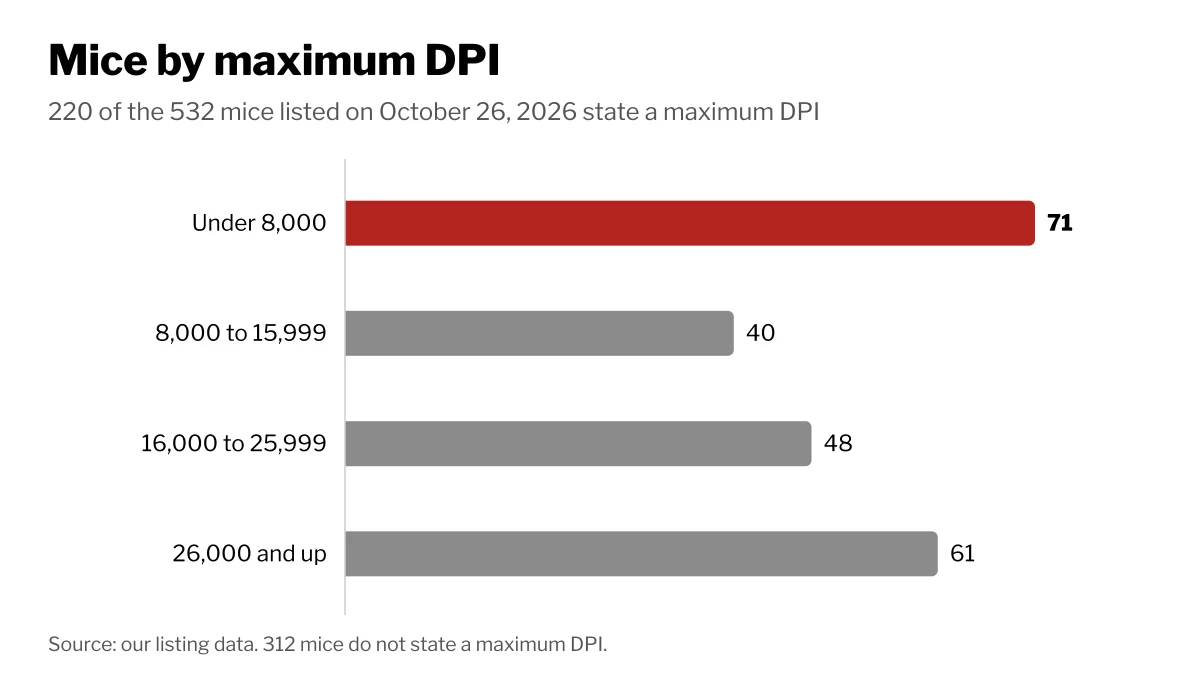
Of the 532 mice listed on Wiki Shopping on October 26, 2026, 220 state a maximum DPI:
| Maximum DPI | Mice on Wiki Shopping |
|---|---|
| Under 8,000 | 71 |
| 8,000 to 15,999 | 40 |
| 16,000 to 25,999 | 48 |
| 26,000 and up | 61 |
DPI vs polling rate
They measure different things:
- DPI is distance: how far the cursor moves per inch of hand movement.
- Polling rate (Logitech calls it report rate) is time: how often the mouse sends its position to the computer, in hertz.
Logitech's G900 settings run from 125 reports per second (8 ms between reports) to 1,000 per second (1 ms). Logitech notes that a higher rate makes the mouse more responsive while a lower one uses less processor time, and it suggests 500 for most PCs. Newer gaming mice go further: Razer lists an 8,000 Hz polling rate for the DeathAdder V4 Pro.
How we count
Maximum DPI is read from each mouse's store listing and grouped into the ranges above. Mice that do not state it are left out of that count. The counts change as listings are added or removed.
Shop by spec
Mice
Wireless, 16,000 to 25,999
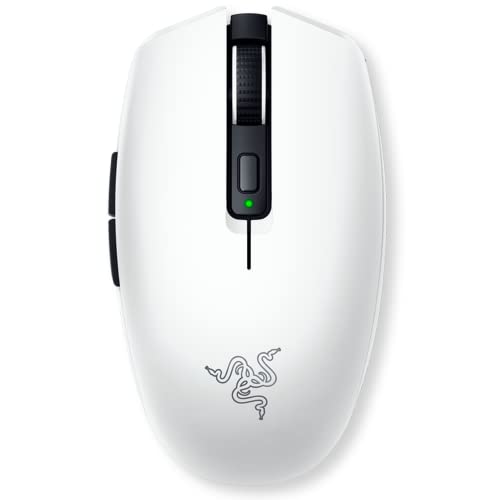
- OUTLAST THE COMPETITION – Up to 950 hours of battery life on Bluetooth and up to 425 hours on Razer HyperSpeed Wireless lets you game, work, and travel longer with fewer interruptions and less charging downtime
- PLAY FASTER WITH LOW-LATENCY WIRELESS – Dual wireless connectivity gives you efficient Bluetooth for everyday productivity or ultra-responsive Razer HyperSpeed Wireless for competitive gaming, FPS titles, and esports play
- LAND EVERY SHOT WITH PIXEL-PRECISE ACCURACY – Razer 5G Advanced 18K DPI Optical Sensor delivers responsive tracking with zero spinouts for precise aiming, fast reactions, and confident control across game genres
- LIGHTWEIGHT FOR QUICKER MOVEMENT – Under 60g excluding battery weight, the compact portable design enables faster swipes, reduced fatigue, and greater control for long gaming sessions at home or on the go
- BUILT TO OUTPLAY FOR YEARS – 2nd Gen Razer Mechanical Mouse Switches feature gold-plated contact points rated for up to 60 million clicks, delivering reliable responsiveness and long-term durability
- CHOOSE YOUR IDEAL BALANCE OF WEIGHT AND ENDURANCE – Compatible with a single AA or AAA battery and engineered with a hybrid battery slot for optimized weight distribution and comfortable handling
Wireless, 6 Buttons

- Max Play: Switch between the robust yet low latency LIGHTSPEED wireless and Bluetooth connectivity on this wireless gaming mouse for total wireless flexibility
- Min Weight: Logitech G309 LIGHTSPEED is a lightweight gaming mouse that weighs just 86 g with the included AA battery or 68 g (battery-free) with use of POWERPLAY wireless charging system
- Max Precision: HERO 25K sensor on this wireless gaming mouse tracks exactly to the sub-micron with zero smoothing for precise wireless gaming
- Min Charging: 300+ hours with AA battery or unlimited battery life with POWERPLAY, so you can focus on the game, not your battery life
- Max Speed: LIGHTFORCE optical-mechanical switches with optical speed, mechanical feel, and optimized gaming performance
- Max Control: Up to 6 programmable buttons for personalized gameplay and custom shortcuts
- What’s in the Box: G309 LIGHTSPEED computer gaming mouse, LIGHTSPEED receiver, receiver extender cable, AA battery, grip tape, user documentation
Wireless, 6 Buttons, 16,000 to 25,999
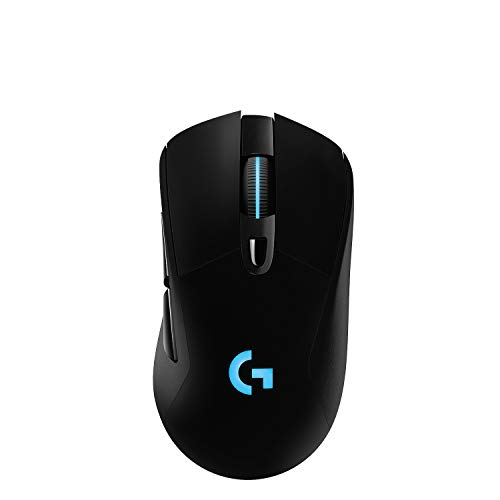
- HERO 25K Sensor: our most advanced, with 1:1 tracking, 400+ IPS, and 100-25,600 max DPI sensitivity, plus zero smoothing, filtering, or acceleration, and 10x power efficiency of previous gen
- LIGHTSPEED Wireless: pro-level responsiveness and connectivity for long lasting, high performance gameplay, with a weight of 95 g and battery life for up to 35 hours of continuous play with default LIGHTSYNC RGB lighting
- POWERPLAY wireless charging: Never worry about your battery life again. Add the POWERPLAY wireless charging system to keep G703 and other compatible G mice charged while at rest and at play* *POWERPLAY Wireless Charging System sold separately
- Supreme Comfort and Quality: brings together comfort, durability, and performance with comfortable design, rubber side grips, 10 g optional weight, and 6 programmable buttons for a customizable gaming experience
- Advanced Button Technology: metal-spring button tensioning keeps primary left and right buttons poised to trigger with less force, for exceptional button feel, response, and consistency every time
- LIGHTSYNC RGB: full-spectrum lighting responds to in-game action, audio, and screen color; customize lighting effects from16.8M colors with G HUB gaming software, and sync across G gear
Wireless

- Reliable Wireless Connectivity: The Lenovo 530 Wireless Mouse offers a dependable connection no matter where you are. Its advanced nano USB receiver utilizes robust 2.4 GHz wireless technology, ensuring seamless performance without the hassle of cords. Stay productive and focused without the constraints of wired setups.
- Precision Tracking at Your Fingertips: Elevate your user experience with the 1200 DPI resolution optical sensor featured in this wireless mouse. Experience responsive and clear tracking that enhances your navigation, whether you're browsing the web, creating presentations, or engaging in detailed design work. Precision is now at your fingertips.
- Durability That Lasts: With the Lenovo 530 Wireless Mouse, longevity is a guarantee. Boasting a remarkable lifespan of up to 8 million clicks for both left and right buttons, this mouse is built to withstand the rigors of daily use. Enjoy reliable performance for years to come, making it an ideal companion for your computing tasks.
- Ergonomic Comfort for Extended Use: Experience unparalleled comfort during long work sessions with the unique and contoured design of the Lenovo 530 Wireless Mouse. Crafted for maximum ergonomics, this mouse fits perfectly in your hand, ensuring all-day comfort. The durable soft touch finish adds a premium feel to your interactions, making productivity a breeze.
- Versatility and Portability: Whether you're left-handed or right-handed, the Lenovo 530 Wireless Mouse accommodates your preference. Its ambidextrous design ensures functionality and comfort for all users. Weighing just 65g (2.29 oz), it's the ultimate travel companion. Slip it into your laptop bag or pocket and enjoy its lightweight portability wherever you go. Plus, with an impressive battery life of up to 12 months (actual duration may vary based on usage), you can confidently use it without worrying about frequent recharges. Choose the Lenovo 530 Wireless Mouse for unparalleled performance, comfort, and convenience.