Monitor Refresh Rate, Explained
Refresh rate, in hertz, is how many times per second a screen draws a new image; a 120Hz screen redraws twice as often as a 60Hz one.

By Paul SyversonFounder.
On this page
The short answer
The refresh rate is how many times per second a screen draws a new image. It is measured in hertz (Hz). NIST, the US measurement agency, defines the hertz as one cycle per second, so a 60Hz monitor redraws the picture 60 times every second and a 240Hz monitor 240 times.
A higher rate makes motion look smoother, which matters most in fast games. It only helps when the computer sends that many frames: a game running at 60 frames per second looks the same on a 60Hz and a 144Hz screen.
The math behind the number
Divide one second by the refresh rate to get the time each image stays on screen:
| Refresh rate | Time per image |
|---|---|
| 60Hz | about 16.7 milliseconds |
| 120Hz | about 8.3 milliseconds |
| 144Hz | about 6.9 milliseconds |
| 240Hz | about 4.2 milliseconds |
Going from 60Hz to 120Hz cuts that time in half. Each further step saves fewer milliseconds than the one before, which is why the jump from 60Hz feels larger than the jump from 144Hz to 240Hz.
Refresh rates on Wiki Shopping
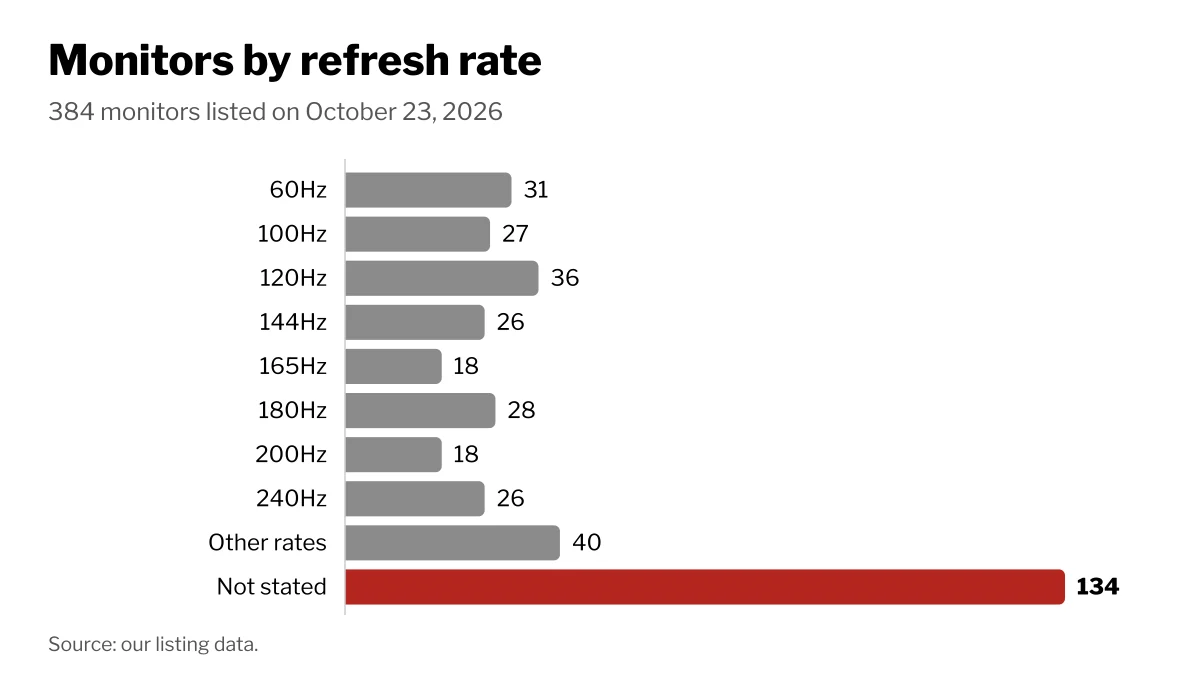
How many of the 384 monitors on Wiki Shopping list each refresh rate, on October 23, 2026. Rates with a filter page link to it.
| Refresh rate | Monitors |
|---|---|
| 60Hz | 31 |
| 100Hz | 27 |
| 120Hz | 36 |
| 144Hz | 26 |
| 165Hz | 18 |
| 180Hz | 28 |
| 200Hz | 18 |
| 240Hz | 26 |
| Other rates | 40 |
| Not stated in the listing | 134 |
Laptop screens use the same unit. On Wiki Shopping you can filter laptops with a 144Hz screen, laptops with a 120Hz screen and laptops with a 240Hz screen.
How to choose
- Office work and video. Text and still images do not change many times per second, so size, resolution and the stand may matter more to you here. The monitors for office work page groups that use.
- Fast games. A high refresh rate pays off when your graphics card can reach those frame rates in the games you play. The monitors for gaming page groups them.
- Check the connection. A monitor's inputs do not always all support its top rate. The maker's specification page lists which input supports which rate.
How we count
Each monitor on Wiki Shopping has its refresh rate read from the store listing. A monitor whose listing gives no rate is counted as "Not stated". Rates without a link have no public filter page yet. The counts change as listings are added or removed.
Shop by spec
Monitors
11.6-inch, IPS

- Portable gaming monitor and speaker system to expand Nintendo Switch
- Charges your Switch while you play, it also works with any console or smart phone
- 11.6 HD IPS Screen with dual speakers and a headphone jack
- With the new iOS 16, you can now pair your Nintendo controllers to your iPhone allowing you to use the controllers with all iPhone games. With an optional Apple Lightning to Digital AV Adapter plus an HDMI Cable, you can now use the UpSwitch and controllers with all iPhone games, plus enjoy movies and videos!
27-inch, FHD 1080p, 100Hz

- CURVED FOR ENRICHED ENGAGEMENT: A truly immersive viewing experience. The curved monitor wraps closely around your field of vision to create a wider view that enhances depth perception. Minimizes peripheral distractions.
- SMOOTH PERFORMANCE FOR YOUR CONTENT: Stay in the action when playing games, watching videos, or working on creative projects.¹ The 100Hz refresh rate reduces lag and motion blur so you don’t miss a thing in fast-paced moments.
- MORE GAMING POWER: Gain a competitive edge with optimizable game settings.² Color and image contrast can be instantly adjusted to see scenes more clearly and spot enemies hiding in the dark, filling the screen with every detail in view.
- GREAT SOUND WITHOUT TAKING UP SPACE: Work, learn, and play without the need for additional devices. With built-in speakers you can free up desk space, minimize connections for a more efficient working environment, and listen to your favorite content with ease.
- KEEP IT EASY ON THE EYES: Care for your eyes and stay comfortable, even during long sessions.³ Advanced eye comfort technology certified by TÜV reduces eye strain by minimizing blue light and reducing irritating screen flicker.
- CONNECT TO MORE: Plug devices straight into your monitor for increased flexibility, making your computing environment even more convenient.
27-inch, 4K UHD, 180Hz, IPS

- 27” 4K Gaming-Speed Meets Clarity - UltraGear's 27-inch 4K UHD gaming monitor delivers stunning native resolution with incredible clarity. With Dual Mode, you choose your edge: play in 4K at 180Hz for fluid detail, or choose Full HD at 360Hz for lightning-fast speed. A 1ms GtG response time keeps every motion crisp and razor sharp.
- Breathtaking UHD Clarity, Bold Colors, and DisplayHDR 400 Brilliance - Stunning 4K UHD on a 27” IPS display with up to 95% DCI-P3 color coverage. Experience deeper blacks, vibrant hues, and enhanced contrast with VESA DisplayHDR 400, delivering breathtaking detail and crisp visuals for captivating gaming and entertainment.
- Dual Mode: 4K UHD 180Hz or Full HD 360Hz - Dual Mode lets you take control of your gaming experience. Enjoy graphically stunning story-driven adventures in 4K UHD at up to 180Hz immersing yourself in epic visuals and rich detail. Or press the hotkey to switch to Full HD at an electrifying 360Hz for ultra-responsive gameplay in FPS, MOBA, or racing titles.
- 1ms Response (GtG) for Crisp Gameplay - 1ms Response Time (GtG) keeps fast-paced gameplay sharp by minimizing blur and ghosting. Whether you're tracking enemies or racing to the finish, every frame stays crisp-giving you the edge when it matters most.
- Ultimate Frame Sync: FreeSync Premium & G-SYNC Compatible - Say goodbye to screen tearing and stutter. With AMD FreeSync Premium and NVIDIA G-SYNC compatibility, this UltraGear monitor delivers ultra-smooth, tear-free visuals, giving you perfect frame sync across PC and next-gen console gaming.
- Dynamic Action Sync - Don’t miss a beat. Dynamic Action Sync helps you spot the action and strike fast by reducing input lag and boosting responsiveness.
- Never In the Dark with Black Stabilizer - Never get caught off guard. Black Stabilizer enhances visibility in low-light scenes so you can spot threats before they see you.
- Advantage of Accuracy with Crosshair - Crosshair offers an accuracy advantage with center-display crosshairs that provide enhanced vision and precision for increased accuracy in first-person shooter games.
- 4-Pole Jack & DTS HP:X: Gaming Audio Unleashed - Experience lifelike 3D audio with DTS Headphone, pushing out spatial sound to make you feel even more part of the game. The 4-pole headphone jack combines stereo audio and mic input, delivering crisp sound and clear game-play comms through a single connection.
- Battlestation Upgrade Adjustable to Gamer Specs - Go big with the narrow bezel, 27” IPS screen. UltraGear's sleek, slim design offers adjustable height, tilt, swivel and pivot control for your ideal view.
34-inch, QHD 1440p, 100Hz, 4 to 5 ms

- DO MORE ON ONE SCREEN: See every detail on the wider display featuring a 21:9 aspect ratio; Ultra WQHD provides the simplest way to maximize screen real estate and experience truly seamless multitasking on just one screen.Brightness (Typical) : 300 cd/㎡. Static Contrast Ratio 3000:1.
- ENJOY A BILLION COLORS W/ INCREDIBLE DEPTH: With HDR10 that displays over 1 billion colors compared to 16.7 million for typical SDR technology, dark colors are darker and the brightest are even brighter; Content is experienced as the creator intended
- CARE FOR YOUR EYES DAY and NIGHT: An ambient light sensor on the monitor detects lighting in your workstation and automatically adjusts brightness; Eye Saver Mode minimizes excessive blue light, and Flicker Free relieves eye strain
- SEE CONTENT SMOOTHER, EVEN GAMING: A faster than average refresh rate updates the image on screen more often every second; 100Hz refresh rate reduces lag and motion blur when playing games, watching videos, or working on design projects
- STAY IN SYNC WITH THE ACTION: AMD Radeon FreeSync keeps the refresh rate of your monitor and graphics card in sync to reduce image tearing for a superfluid entertainment experience; Watch movies and play games without interruptions
- 2 x HDMI 2.2 INPUTS plus 1 x DISPLAYPORT 1.2 INPUTS: With PBP, view input from 2 simultaneous sources at native resolution, so you can review 2 projects or run 2 programs; Use PIP to resize a 2nd source and work on 1 task while monitoring another
- EXPAND YOUR VIEW, ENHANCE YOUR FOCUS: Minimal bezel brings maximum concentration; The virtually bezel free screen shows you the full picture and looks almost gapless when used in a dual monitor setup so you can see more at once with no distractions