KVM Switches, Explained
A KVM switch lets one keyboard, monitor and mouse control two or more computers; match its port count, video link, resolution and refresh rate to your setup.

By Paul SyversonFounder.
On this page
The short answer
KVM stands for keyboard, video and mouse. A KVM switch is a box that connects one set of those devices to several computers and lets you choose which computer they control. You switch with a button, or on most modern units with a keyboard hotkey, often with an on-screen list of the connected computers.
To choose one, check four things:
- How many computers it connects.
- Which video connection your computers and monitor use (HDMI, DisplayPort, USB-C or VGA).
- Resolution and refresh rate, so the switch does not hold your monitor back.
- How many monitors each computer drives.
How many computers
Traditional units handle 2 to 64 computers, and enterprise systems that chain several switches together can pass 1,000.
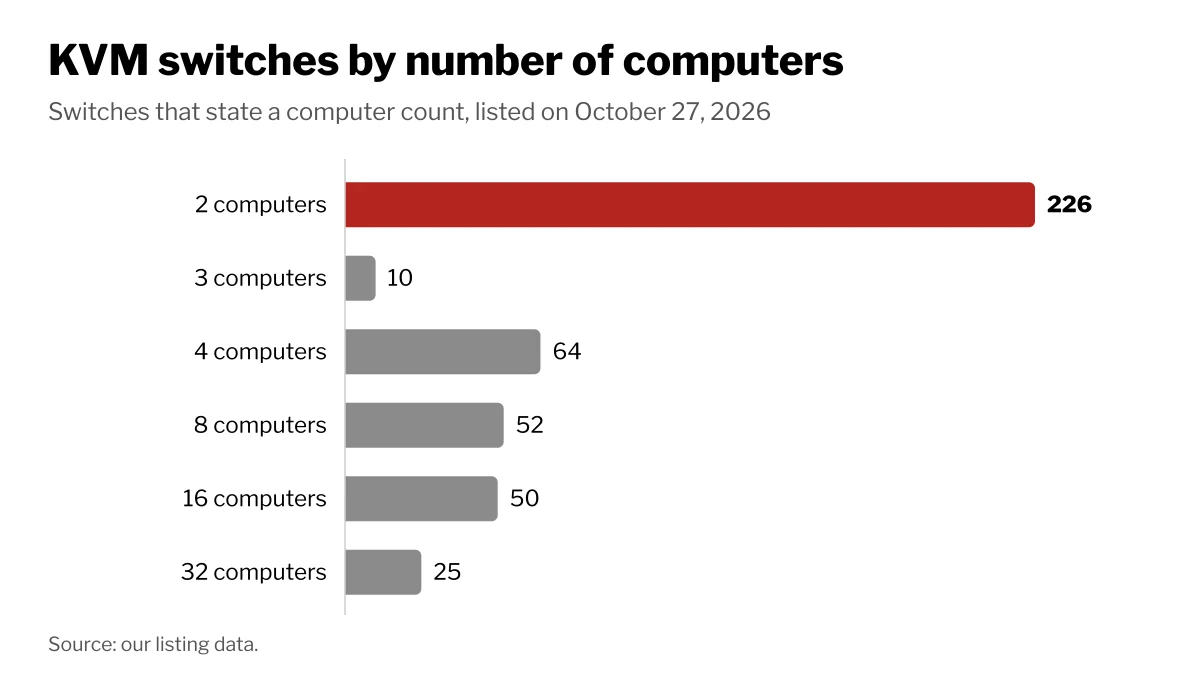
On Wiki Shopping, 226 KVM switches list 2 computers, 64 list 4, 52 list 8, 50 list 16 and 25 list 32.
Video: connection, resolution and refresh rate
The switch passes the video signal from the chosen computer to your monitor, so it has to support the same connection and the resolution and refresh rate you want. A 4K monitor at 144 Hz needs a switch rated for 4K at 144 Hz; a switch rated for 60 Hz caps the monitor at 60 Hz.
| Video connection | KVM switches on Wiki Shopping |
|---|---|
| HDMI | 176 |
| VGA | 54 |
| DisplayPort | 37 |
| Mixed inputs | 27 |
| HDMI and DisplayPort | 26 |
| USB-C | 20 |
VGA is still common in industrial and server rooms. For refresh rate, 190 switches list 60 Hz and 34 list 144 Hz; 197 list 4K resolution.
EDID emulation matters too. Your monitor tells a computer which resolutions it supports through a data block called EDID. When a switch hides the monitor from a computer that is not selected, that computer may fall back to a low safe resolution and rearrange your windows. A switch with EDID emulation keeps presenting monitor data to every computer. 90 switches on Wiki Shopping list EDID emulation.
How the USB side works
How a switch handles the keyboard and mouse decides how fast switching feels:
- Hub-style switching disconnects and reconnects the USB devices each time, which can take 10 to 15 seconds.
- Emulated USB switches at once and supports hotkeys, but may pass only basic keyboard and mouse functions.
- Dynamic device mapping (DDM) keeps special keyboard and mouse functions on every computer with almost no delay, and costs more.
Types of KVM switch
| Type | What it does | On Wiki Shopping |
|---|---|---|
| KVM switch | Desktop or rack box for computers in the same room | 305 |
| USB switch | Shares USB devices only, no video | 92 |
| KVM over IP | Sends the screen, keyboard and mouse over a network, usually to a web browser | 69 |
| Rack console | A rack drawer with a screen, keyboard and touchpad built in | 42 |
| KVM extender | Puts the keyboard, monitor and mouse far from the computer | 20 |
KVM over IP works even while a server is still booting, before its operating system starts, which remote desktop software cannot do. Extenders over Category 5 cable can reach up to 1,000 feet (300 m).
How we count
Computer count, video connection, resolution, refresh rate, features and type are read from each switch's store listing. Switches that do not state a value are left out of that count. The counts change as listings are added or removed.
Shop by spec
KVM Switches
USB switch, 2 Computers

- 2 in 4 Out USB Switch Box: UGREEN 4 port USB sharing switch allows one button swapping between 2 computers to share 4 USB 2.0 peripheral devices without constantly swapping cables or setting up complicated network sharing software. (*Not a KVM switch and does not support a monitor or video transmission.*)
- Ideal for Sharing Multiple Devices: This USB Switch can share USB devices such as printers, scanners, mouse, keyboards, card readers, flash drives, etc. between 2 computers.(*It is recommended to power supply when using multiple devices simultaneously to avoid disconnection due to insufficient power.*)
- Wide Compatible System: 4 port USB switch works flawlessly with Windows 10/8/8.1/7/Vista/XP, Mac OS X, Linux, and Chrome OS. Driver-free, simply plug and play. (If the input PC only has a USB C port, please use a USB C to A adapter instead of a USB C to A cable, directly using the cable may not work.)
- One-Botton Switch & LED Light Indicator: You can easily switch between 2 computers with a single click on the button with LED indicating the active computer. UGREEN USB Switcher make switch effortless.
- Stable Connection: USB 2.0 sharing switch with a separate micro USB female port for option power, which optimizes its compatibility with more devices, such as HDD, Digital Video Cameras, SSD, etc. (The device doesn't include a charging cable and charger. Please use a Standard 5V charger, too high voltage output is not allowed.)
USB switch, 2 Computers
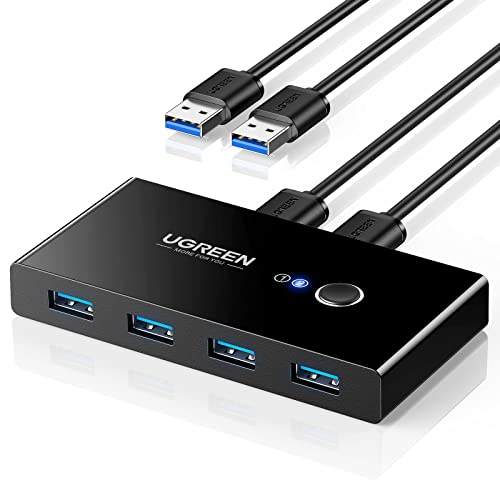
- 2 PCs Share Multiple Devices: UGREEN 2 in 4 out USB 3.0 switch supports 2 computers share 4 USB devices like keyboards, mouses, U disk, printers, scanners, USB cameras, headphones, etc. It's convenient for you to switch freely between your work computer and personal computer, greatly improving work efficiency. (*Not a KVM switch and does not support a monitor or video transmission.*)
- Transfer Files in Seconds: With the 4x USB 3.0 ports, UGREEN USB Switcher supports up to 5Gbps data transfer speed. You can easily transfer data from U disk, mobile hard disk to computer. It's backward compatible with USB 2.0, too. (*It is recommended to power supply when using multiple devices simultaneously to avoid disconnection due to insufficient power.*)
- Wide Compatibility & Driver-free: UGREEN USB 3.0 Switch selector is plug-and-play for Windows, macOS, Chrome OS, and Linux computers. Just plug in and enjoy efficient work. (If the input PC only has a USB C port, please use a USB C to A adapter instead of a USB C to A cable, directly using the cable may not work.)
- One-Button USB Switch: With the USB switcher button and LED indicator design, you can freely switch multiple USB devices between two computers with one click and clearly know the working status.
- High Power Devices Supported: UGREEN USB Switch is designed with an extra USB C (5V 2A) power supply port. If you use some high-power devices such as HDD, USB cameras, headphones, dockingstation, microphone etc, you may need to connect extra power for stable performance. (The power adapter is not included)
Rack console, 8 Computers

- 1U rackmount console with built-in 8-Port KVM switch, 19 LCD screen, keyboard, and touchpad
- Includes (x8) P778-Series USB/PS2 Combo KVM Cable Kits
- Additional ports are provided for the connection of an external console (PS/2 or USB) or IP remote access unit (Tripp Lite Model B051-000)
- Control up to 504 computers by daisychaining up to 31 additional B022-U16 KVM switches
- RELIABLE PRODUCT FULLY BACKED AND SUPPORTED: This product is covered by a 1-Year Limited Manufacturer's Warranty. To best support your purchase, Eaton's expert technical team is available via phone, web, or email to address any concerns.
KVM switch, 4 Computers, VGA

- Switch KVM Switch 2 Cpnt
- Number of ports: 4; connectivity type: USB
- High quality
- Brand: StarTech.com